![How Much Does VoIP Cost? [Pricing Guide & Comparison]](https://file-host.link/website/invisionaz-9wld0t/assets/blog-images/37042bab-67d2-4a39-aa61-b78fe79a03e0/1779019870685793_153e025f6b6b4eb5b248b559cea9be86/360.webp)
Introduction
Businesses across the Phoenix Metro area — medical practices, law firms, manufacturers — are dropping traditional phone lines fast. And the numbers back it up: according to ElectroIQ's 2025 VoIP statistics, 78% of U.S. small businesses have already adopted VoIP, with companies reporting phone bill reductions of up to 50% after switching.
That said, "how much does VoIP cost?" doesn't have a single answer. Pricing shifts based on user count, feature requirements, contract length, and how much hardware you're starting from scratch with. A solo operator and a 75-person professional services firm are both "small businesses" — but they'll land in very different places.
This guide gives you the full cost picture — monthly plans, hidden fees, hardware, setup costs, and a real comparison against traditional PBX — so you can make a decision based on actual numbers.
Key Takeaways
- VoIP costs $15–$75+ per user/month, with most small businesses landing between $20–$35
- Main cost drivers: user count, feature tier, contract length, and hardware choices
- Budget separately for one-time costs — setup, hardware, and number porting aren't included in monthly fees
- Taxes and regulatory fees add roughly 17–28% on top of your base monthly rate
- Cloud VoIP costs 37–41% less than traditional PBX over a five-year period
How Much Does VoIP Cost? A Pricing Overview
VoIP has no fixed price — and businesses that treat it like a commodity purchase end up in one of two situations: they underbuy and hit a wall when they need call recording or CRM integrations, or they overbuy enterprise-tier tools their team will never touch.
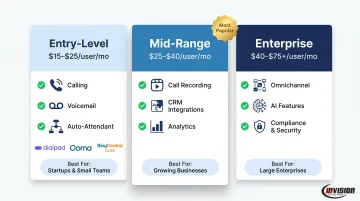
Here's a quick orientation across the three main pricing tiers:
| Tier | Price Range | Best For |
|---|---|---|
| Entry-Level | $15–$25/user/month | Solos, small teams under 20 users |
| Mid-Range | $25–$40/user/month | Growing businesses, 20–100 users |
| Enterprise | $40–$75+/user/month | Contact centers, multi-location orgs |
Important: These are base subscription rates. Taxes, hardware, and advanced add-ons are almost never included.
Entry-Level / Basic Tier ($15–$25/user/month)
At this tier, you're getting the essentials: unlimited domestic calling, basic voicemail, call forwarding, an auto-attendant (virtual receptionist), and a softphone app for mobile and desktop.
Real examples from current providers:
- Dialpad Standard – $15/user/month (annual): unlimited US/Canada calling, AI voicemail transcription, smart call routing
- Ooma Office Essentials – $19.95/user/month: virtual receptionist, call forwarding, local number included
- RingCentral Core – $20/user/month (annual): unlimited domestic calls, team messaging, video meetings (up to 100 participants)
This tier works well for solo operators and teams under 20 users with straightforward communication needs — no compliance requirements, no CRM integrations, no call recording. If that describes your business today but not in 12 months, factor that into your decision.
Mid-Range / Professional Tier ($25–$40/user/month)
The jump from basic to mid-range unlocks the features that professional services firms actually need day-to-day — and most growing businesses land here.
What's typically included:
- Call recording (auto and on-demand)
- CRM integrations (Salesforce, HubSpot)
- Multi-level auto-attendants
- Video conferencing
- Business SMS
- Advanced analytics
RingCentral Advanced ($25/user/month annual) is a good benchmark here — it adds call monitoring, CRM integrations, and 1,000 toll-free minutes. Vonage Premium ($29.99/line/month) brings multi-level auto-attendants and video conferencing for up to 100 participants.
Those features matter most to regulated industries. Healthcare practices, law firms, and financial services firms in the Phoenix area typically need documented call logs, HIPAA-aligned configurations, or integrations with practice management software — making the mid-range tier the right starting point, not an upgrade to consider later.
Enterprise / Advanced Tier ($40–$75+/user/month)
This tier is built for contact center infrastructure, AI-powered tools, and compliance-grade capabilities:
- Omnichannel routing (voice, chat, email)
- AI transcription and sentiment analysis
- Workforce management tools
- Compliance and retention tools
- Advanced analytics dashboards
RingCentral RingCX starts at $65/user/month. Nextiva Scale reaches $75/user/month. Both products target dedicated customer-facing teams and organizations managing high call volumes across multiple locations. For most SMBs, the mid-range tier covers everything needed without the added complexity.
Key Factors That Affect VoIP Pricing
Number of Users
Most providers charge per user per month, so headcount directly drives your total bill. The math seems straightforward until volume discounts enter the picture.
- A 5-person team at $25/user pays $125/month with no negotiating leverage
- A 50-person team at $25/user theoretically pays $1,250/month — but at that scale, providers like RingCentral and Vonage will negotiate
Volume discounts typically kick in at 25–50 users for Vonage and 50–100 seats for RingCentral. If you're under 25 users, don't count on discounts — your best lever is annual billing (covered below).
Features and Add-Ons
A low advertised price can quickly turn expensive once you add the features your business actually needs. Advanced capabilities often sold as add-ons include:
- Call recording and retention: $5–$15/user/month
- CRM integrations: sometimes included in mid-tier, sometimes not
- AI transcription tools: $39–$60/user/month (RingCentral's AI add-ons)
- Additional toll-free numbers or direct lines: $5–$10/number/month
Always build your quote around the full feature list your team will use — not the base plan price.
Contract Length
This is the single largest discount lever most SMBs overlook. RingCentral's official pricing documents savings of up to 33% on annual billing versus month-to-month. Their Core plan runs $20/user/month annually versus $30/user/month on monthly billing — that's a $10/user difference.
Annual contracts generally reduce rates by 20–33% across major providers. The tradeoff: early termination penalties apply if your headcount changes or you switch providers mid-term. If your headcount is likely to shift in the next 12 months, start month-to-month and lock in annual pricing once your team size stabilizes.
Deployment Model
Two deployment options exist, with very different cost structures:
- Cloud-hosted VoIP: Low upfront cost, subscription-based, provider handles all maintenance — the default choice for most SMBs without dedicated IT infrastructure
- On-premise PBX: Significant hardware investment upfront, plus ongoing internal IT overhead for maintenance and upgrades — still used by organizations with strict security or regulatory requirements, but increasingly uncommon for SMBs
Hardware
Hardware costs range from zero to significant, depending on your setup:
- Softphone apps on existing computers/smartphones: $0
- Entry-level IP desk phones (Yealink T31G): ~$60
- Mid-range IP desk phones (Poly VVX 350): ~$190
- Premium/executive phones: $300–$530
- Conference room systems (Yealink CP925): ~$330
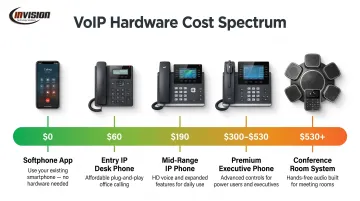
Many businesses start software-only and add physical phones selectively for reception desks or conference rooms.
VoIP Cost Breakdown: One-Time vs. Recurring Expenses
Budgeting only for the monthly subscription is one of the most common mistakes businesses make when evaluating VoIP. The true cost has two distinct layers.
One-Time / Upfront Costs
| Cost Category | Typical Range |
|---|---|
| IP desk phones | $60–$530 per unit |
| Number porting fees | $10–$30 per number |
| Setup/activation fees | $50–$200 |
| Staff training | $500–$1,500 |
| Network upgrades (PoE switches, QoS routers) | $100–$500+ |
Cloud-based VoIP eliminates most traditional installation costs. Businesses using softphones on existing hardware and broadband can often get started with little to no upfront cost. Network upgrades are only required if you're adding IP desk phones (which need PoE switches) or if your current internet connection can't reliably prioritize voice traffic.
Recurring / Ongoing Costs
Your monthly bill typically has four components:
- Base subscription – per-user license fee
- Calling plan/PSTN usage – particularly for international calls; domestic calls are typically included
- Feature add-ons – call recording, AI tools, additional integrations
- Phone number fees – additional direct lines, toll-free numbers
The tax layer deserves special attention. According to the Tax Foundation's 2025 data, the national average combined telecom tax, fee, and surcharge rate hit a record 27.60% in 2025.
For Arizona businesses specifically, that rate is 26.06% — meaning a plan advertised at $25/user actually costs closer to $31.52/user after E911 fees, Federal USF surcharges, state telecom taxes, and compliance recovery fees are applied.
Budget for 17–28% in taxes and fees on top of your base rate, depending on your state.
Beyond taxes, hardware carries its own replacement cycle — and those costs add up over time:
- Headsets: replace every 2–3 years
- IP desk phones: replace every 5–7 years
Build these into any multi-year IT budget so they don't catch you off guard.
VoIP vs. Traditional Phone Systems: Cost Comparison
Choosing between traditional PBX and cloud VoIP isn't just a technology decision — it's a financial one. Here's how the two stack up for a 20-user business:
| Cost Category | Traditional On-Premise PBX | Cloud VoIP |
|---|---|---|
| Upfront system cost | $13,000–$30,000 | $0–$3,000 (hardware optional) |
| Per-user monthly cost | $10–$25 (SIP trunks only) | $20–$35 (full-featured) |
| Hardware | $80–$160/unit, plus server | $0 (softphone) to $60–$190/unit |
| Maintenance | $1,000–$3,000/year + IT labor | Handled by provider |
| Scalability | Buy more hardware | Add users in minutes |
| Major upgrades | $1,000–$5,000 | Included in subscription |
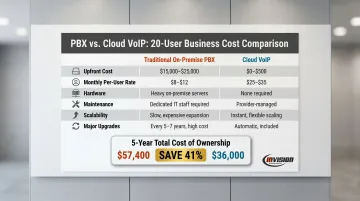
First-year cost for 20 users:
- Traditional PBX: $13,000–$30,000 upfront + $200–$500/month in SIP trunks + maintenance
- Cloud VoIP: $5,300–$8,400 total (including optional IP desk phones)
The gap compounds over time. Five-year total cost of ownership for a 25-user team runs approximately $82,500 for traditional PBX versus $48,750 for cloud VoIP — a 41% savings — with comparable figures of roughly $57,400 versus $36,000 for 20 users. These are directional estimates from regional IT consulting data, but the cost advantage of cloud VoIP over a multi-year horizon is consistent across sources.
For most Phoenix Metro businesses evaluating the switch, the first-year numbers alone make a strong case — and the savings only grow as the system scales.
How to Budget for VoIP the Right Way
A few practical steps that prevent the most common budgeting mistakes:
1. Start with a realistic user count. Project headcount 12–24 months out, not just today. Mid-contract upgrades often come at higher rates. Also identify which users need full-featured licenses versus light users who only need basic calling.
2. Calculate total cost, not just the per-user rate. Take your base plan, add 17–28% for taxes and fees, layer in any required add-ons, and factor hardware. A plan at $20/user realistically lands at $25–$28/user all-in.
3. Match features to actual needs. Don't pay for enterprise AI tools your team won't use. That said, for healthcare, legal, and financial services firms, compliance-grade features — call recording retention, audit logs, encrypted voice traffic — aren't optional extras. They're required line items.
4. Get a fully-loaded quote. Ask providers to itemize taxes, fees, and any add-ons before signing anything. The advertised rate and the real bill are rarely the same number.
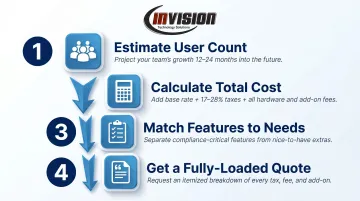
That last step — getting a truly itemized quote — is where many Phoenix Metro businesses get tripped up. A local managed IT partner can pull those numbers together for you before you sign anything.
InVision Technology Solutions supports both Cisco and Switchvox (Sangoma) VoIP systems, with hosted and on-premise options available. There are no long-term service commitments, which means the system recommendation reflects your actual needs — not a contract target. They work across healthcare, legal, manufacturing, and financial services, where accurate cost modeling matters more than a low headline price.
Frequently Asked Questions
How much does a VoIP phone system cost for a small business?
Most small businesses under 25 users pay between $15 and $35 per user per month for cloud-based VoIP on an annual plan. Add 17–28% for taxes and regulatory fees, plus any hardware costs, to get your realistic total monthly expense.
How much does a PBX cost?
A traditional on-premise PBX system typically requires $800–$1,500 or more per user in upfront hardware and installation costs for a 20-user deployment. Add $1,000–$3,000 per year in maintenance contracts on top of that, making it significantly more expensive than cloud VoIP for most small and mid-size businesses.
Which is better, PBX or VoIP?
For most modern businesses, cloud VoIP offers lower total cost, easier scalability, and provider-managed maintenance. On-premise PBX may suit organizations with very specific security or regulatory requirements and dedicated IT staff.
What is the best VoIP phone for a small business?
Softphone apps on existing devices are the most cost-effective starting point — no hardware cost required. For teams that prefer physical handsets, Yealink entry-level models ($60–$80) and mid-range Poly phones ($190) are widely used. Many businesses start software-only and add desk phones selectively as needed.
Are there hidden fees in VoIP pricing?
VoIP fees are rarely hidden, but they are routinely underestimated. E911 charges, Federal USF surcharges, state telecom taxes, number porting fees, and feature add-ons all stack on top of the base rate. Always request a fully-loaded quote — including taxes and fees — before committing to a plan.
Do I need to upgrade my internet connection to use VoIP?
Most small businesses with standard broadband can support VoIP without major changes. Larger teams or high call volumes may benefit from a bandwidth assessment first. Configuring QoS settings on your existing router can also prioritize voice traffic and improve call quality without a full infrastructure upgrade.