Many businesses underestimate both sides of the equation. They see a monthly quote, assume it's all-in, and sign on. Then the onboarding fee hits. Then the compliance add-on. Then the after-hours surcharge. On the in-house side, they budget for salary but forget benefits, training, recruiting, and the very real cost of a single person being sick or on vacation during an outage.
This article breaks down current 2026 pricing ranges, the factors that push costs up or down, what a managed IT contract actually includes, and a practical way to calculate whether outsourcing genuinely makes financial sense for your business.
Key Takeaways
- Outsourced managed IT support typically costs $100–$250 per user per month for SMBs, with regulated industries paying 20–30% more
- The biggest cost drivers are user count, service scope, compliance requirements, and support hours
- For businesses under 50 employees, outsourcing is almost always cheaper once fully loaded in-house costs are factored in
- Hidden costs such as onboarding fees, project exclusions, and compliance add-ons can push real spend 10–30% above the quoted price
- Match your pricing model to your usage: per-user managed plans for steady needs, break-fix for minimal or unpredictable IT demands
How Much Does IT Support Outsourcing Cost in 2026?
IT support outsourcing doesn't have a fixed price. Costs shift based on pricing model, business size, service scope, and industry. Misunderstanding this leads to underbudgeting, or worse — choosing a provider that looks cheap on paper but delivers far less than you actually need.
Pricing by Model
Four primary pricing models dominate the market:
| Model | Typical 2026 Range | Best For |
|---|---|---|
| Break-fix (hourly) | $100–$400/hr | Very limited, sporadic needs |
| Per-user monthly | $100–$250/user/mo (up to $400 with advanced security) | Most SMBs |
| Flat-rate fully managed | ~$4,500/mo for 30 users | Defined environments |
| Retainer | Varies; not publicly standardized | Hybrid or supplemental coverage |
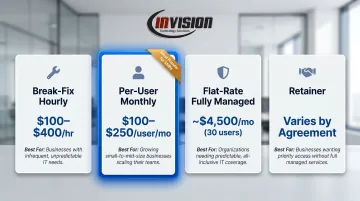
Per-user managed pricing is the dominant model for SMBs in 2026, according to multiple MSP pricing guides. It aligns the provider's incentive with uptime rather than billable incidents — meaning they earn the same fee whether systems run clean or constantly break, so keeping things running is in their interest too.
Pricing by Business Size
Company size affects both the per-user rate and what's typically bundled in:
- Micro (1–10 employees): Per-user rates at the lower end of ranges; standard inclusions apply, but the small user count means less volume leverage
- Small (11–50 employees): Basic managed bundles typically $125–$175/user/mo; advanced tiers with more security run $175–$200/user/mo
- Medium (51–150 employees): Volume discounts apply; base rates can fall to $100–$150/user/mo, with advanced options at $150–$175/user/mo
What's typically included: Remote helpdesk, endpoint monitoring and patching, backup administration, Microsoft 365 support, vendor coordination, and user onboarding/offboarding.
What's typically excluded: On-site visits, hardware procurement, major project work (migrations, network redesigns), after-hours support, and compliance-specific documentation.
Industry Premiums
Regulated industries pay more, and it's by design. Healthcare, legal, and financial services organizations carry added obligations around security tooling, audit documentation, and compliance monitoring — all of which push baseline costs higher.
Common premium drivers by sector include:
- HIPAA (healthcare, dental): Compliant MSP contracts typically carry a 20–30% premium over standard rates
- PCI-DSS (financial, retail): Compliance tooling — vulnerability scanning, managed SIEM, encryption — adds discrete line items that can run into thousands annually
- Legal and accounting: Audit documentation requirements and data retention policies often require specialized configurations not included in standard bundles
For Phoenix Metro businesses in healthcare, dental, legal, or accounting, compliance costs need to be priced explicitly — not assumed to be bundled into a standard per-user rate.
Key Factors That Drive IT Support Outsourcing Costs
Every line item in an IT support contract traces back to something concrete: how much time the provider spends on your account, what tools they deploy, and what commitments they're making in writing. Understanding these drivers helps you evaluate quotes accurately — and spot gaps before you sign.
Scope of Services
A contract covering only helpdesk and basic monitoring costs noticeably less than one that includes:
- Patch management across all endpoints
- Backup and disaster recovery management
- Vendor coordination and license management
- Cloud administration (Microsoft 365, Azure)
- Strategic IT planning and vCIO advisory
Providers price based on time and expertise required. More scope means higher monthly costs, but it also means more coverage and fewer gaps in your protection.
Number of Users and Devices
User count and device count are the primary scaling variables in per-user pricing models. More users mean more support volume; more devices mean more endpoints to monitor, patch, and secure.
Before requesting quotes, get an accurate count of both — including shared workstations, servers, and mobile devices. Providers use these numbers to calculate your baseline cost.
Security and Compliance Requirements
Businesses with strict security obligations require additional layers that add cost above the baseline:
- Healthcare clients (HIPAA): Encryption, audit logging, access controls, and breach notification protocols
- Legal firms: Data segregation, matter-specific security controls, and records retention compliance
- Financial services (PCI-DSS, SOX): Managed SIEM, vulnerability scanning, and detailed audit documentation
These aren't optional extras for regulated businesses — they're minimum requirements. Any provider that doesn't price them separately (or bake them into a clearly defined compliance tier) likely isn't delivering them.
Technology Complexity and Infrastructure Age
A standardized, cloud-forward environment with current hardware costs less to support than a mixed setup with legacy servers, custom line-of-business applications, or multi-site configurations. Providers charge more for complexity because it requires deeper expertise and longer resolution times. If your environment includes any of these, expect to pay toward the higher end of per-user ranges.
Support Hours and Response Time Expectations
Standard business-hours coverage is priced lower than 24/7 support. Beyond coverage hours, guaranteed response time SLAs directly affect cost — a provider committed to a 15-minute critical response must staff accordingly. Common SLA tiers run:
- Critical issues: 15 minutes to 1 hour response
- Medium priority: 1–4 hours
- Low priority: 4–8 business hours
Faster commitments require more staffing depth, which shows up in the price. Verify what "response time" means in a contract — acknowledgment time and resolution time are different things.
True Cost Breakdown: What You're Really Paying For
The monthly service fee is the starting point, not the whole picture. Understanding the full cost structure prevents budget surprises six months into a contract.
One-Time and Setup Costs
Most providers charge an onboarding or setup fee to audit your environment, deploy monitoring tools, document systems, and transfer institutional knowledge. Typical ranges:
- Standard onboarding: $1,000–$5,000 for small environments
- Complex migrations or assessments: $1,500–$15,000+
Some providers waive onboarding fees tied to longer agreements. If a provider quotes zero setup cost without explaining why, ask what's actually being skipped — a thorough onboarding directly affects ongoing service quality.
Recurring Monthly Costs
Beyond the base fee, security-focused add-ons are frequently priced separately:
- Endpoint Detection and Response (EDR): ~$5–$12/endpoint/month
- Advanced email security: Starting around $5/user/month
- Backup management: ~$20/device/month where billed separately
- Compliance reporting/managed SIEM: Can reach $5,000–$10,000/month for enterprise-grade tools
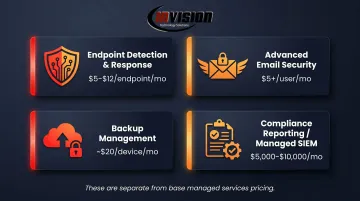
These add-ons are standard components of a properly protected SMB environment in 2026. If they're not included in the base quote, confirm they're priced separately — not absent entirely.
Hidden and Overlooked Costs
The most commonly missed budget items:
- After-hours incident charges: ~$200/hour for out-of-scope or after-hours tickets
- Project work overages: Server replacements, email migrations, and network redesigns are typically excluded from managed contracts
- Compliance documentation: Audit support and policy documentation often require separate engagement
- Provider migration costs: Switching providers mid-contract can involve data extraction fees and transition project costs
Before signing, ask for a written list of what triggers an additional charge. If the provider can't produce one clearly, that's an answer in itself.
The Cost of Not Having Adequate IT Support
Knowing exactly what you're paying for matters — but so does understanding what you're paying to protect against. IBM's 2025 Cost of a Data Breach report puts the U.S. average data breach at $10.22 million, with healthcare breaches averaging $7.42 million.
Breaches aside, unplanned downtime costs SMBs tens to hundreds of thousands of dollars per day depending on revenue mix and headcount. At those exposure levels, a $150/user/month managed services contract isn't a line-item cost — it's risk mitigation with a price tag attached.
Outsourced vs. In-House IT: Which Is Actually Cheaper?
For most SMBs under 50 employees, outsourcing wins on total cost — but the comparison has to be done correctly.
The Real Cost of One In-House IT Hire
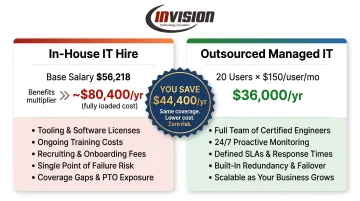
A Phoenix Metro Help Desk Tier 1 technician earns a midpoint salary of $56,218 in 2026, per Robert Half. Apply the BLS benefits multiplier of approximately 1.43x for total compensation, and the fully loaded cost reaches roughly $80,400 per year — before tooling, certifications, training, recruiting costs, and coverage gaps from vacation, sick days, and turnover.
That single hire also delivers limited coverage. One person can't provide 24/7 support, can't cover all specializations, and has a ceiling on expertise. When they leave, institutional knowledge walks out with them.
That turnover risk alone shifts the math. A managed services contract for a 20-person company at $150/user/month runs $36,000 per year — and comes with a team of engineers, defined SLAs, 24/7 monitoring, and built-in redundancy.
When Outsourcing Makes Sense — and When It Might Not
Outsourcing is typically cheaper when:
- You have fewer than 50 employees and need broad IT coverage
- Your environment is reasonably standardized (consistent hardware, software, and cloud tools)
- You can't justify full-time IT headcount but need consistent support
In-house starts to compete at larger scale:
- You have 100+ employees with complex, specialized infrastructure
- Your IT function drives core business operations and needs deep institutional knowledge
- You can build a full team across multiple specializations at scale
InVision Technology Solutions works with Phoenix Metro businesses on both sides of that line — whether you're scaling up or keeping IT lean. Transparent upfront pricing, two dedicated engineers per client, and no required service commitment mean you can test whether outsourcing delivers the cost predictability you need before making a long-term call.
How to Estimate Your IT Support Budget (and Mistakes to Avoid)
Building a Baseline Estimate
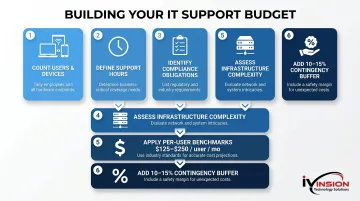
- Count your users and devices — separate servers, desktops, laptops, and mobile devices
- Define required support hours — business-hours only, or do you need 24/7?
- Identify compliance obligations — HIPAA, PCI-DSS, SOX, or none
- Assess infrastructure complexity — modern/cloud-forward vs. legacy/mixed
- Apply per-user benchmarks — $125–$175/user/month for standard; $175–$250 for compliance or advanced security
- Add a contingency buffer — typically 10–15% — for onboarding, project work, and compliance add-ons that commonly appear outside the base fee
Once you have a baseline number, the next step is avoiding the traps that inflate costs or leave coverage gaps.
The Four Most Common Budgeting Mistakes
- Focusing only on the monthly quote — setup fees, add-ons, and project overages change the real number
- Choosing the cheapest provider without checking SLAs — a low price with a 4-hour response time SLA is a different product than one with a 1-hour guarantee
- Over-specifying for your actual size — enterprise-grade compliance tooling for a 15-person firm is usually unnecessary spend
- Ignoring the cost of coverage gaps — underbuying IT support and then absorbing breach or downtime costs is rarely the savings it appears to be
What to Look for Beyond Price
When comparing providers, look for:
- Documented SLAs with specific response time commitments in writing
- Transparent scope definitions — a clear list of what is and isn't included
- Relevant certifications — Microsoft Solutions Partner designation, Cisco certifications signal technical depth
- Scalability terms — can you add users without penalty as the business grows?
For Phoenix Metro businesses evaluating local MSPs, InVision Technology Solutions provides itemized pricing with no service commitment required, so you can compare true costs against other providers before signing anything.
Frequently Asked Questions
How much does outsourced IT support cost per month for a small business?
For a business with 10–50 employees, expect $125–$200 per user per month for standard managed services. Compliance requirements or advanced security needs push that higher. Per-user pricing is the most common SMB structure in 2026.
Is outsourcing IT support actually cheaper than hiring in-house?
For most businesses under 50 employees, yes. When you factor in salary, benefits, training, tooling, and coverage gaps, the math shifts quickly. A fully loaded Phoenix IT hire runs ~$80,400/year before tools; a comparable managed contract for 20 users can run $36,000/year with broader coverage.
What is typically included in a managed IT support contract?
Most contracts cover remote helpdesk, endpoint monitoring and patching, backup management, basic cybersecurity controls, and vendor coordination. Providers typically charge extra for strategic IT planning, on-site support, and compliance documentation — or reserve those for higher-tier plans.
What hidden costs should I watch for in IT outsourcing contracts?
Watch for these contract extras before signing:
- Onboarding fees ($1,000–$5,000+)
- After-hours incident charges (~$200/hour)
- Project work billed separately from monthly support
- Compliance-specific add-ons not in the base quote
- Exit or data migration fees when switching providers
How do I choose the right IT support pricing model for my business?
Businesses with consistent headcount and steady IT needs should use per-user managed pricing — it's predictable and scales cleanly. Organizations with sporadic or unpredictable IT needs may start with break-fix. Match the model to your actual usage pattern, not what sounds cheapest upfront.
Does my industry affect how much I pay for outsourced IT support?
Yes, meaningfully. Healthcare, legal, and financial services organizations typically pay 20–30% more than baseline rates due to compliance monitoring, security documentation, and audit requirements. Budget for this explicitly rather than assuming compliance is bundled into a standard quote.