Introduction
IT demands don't wait for your team to catch up. For many growing businesses, the workload keeps expanding while the internal IT team stays the same size — or doesn't exist at all. That puts decision-makers in a familiar bind: hire more staff, outsource everything, or find something in between — each with its own risks.
Those risks aren't theoretical. According to IBM's 2024 Cost of a Data Breach Report, organizations with severe security staffing shortages paid $1.76 million more per breach on average than those with adequate coverage. For Phoenix Metro businesses operating in one of the country's riskiest states for cybercrime, that gap is hard to ignore.
This article breaks down co-managed IT versus fully managed IT — what each model is, how they differ in structure and cost, and which one fits where your business actually stands today.
Key Takeaways
- Co-managed IT pairs an external MSP with your existing internal IT team, so you retain control while the MSP fills capability gaps
- Fully managed IT hands full IT responsibility to the MSP, covering helpdesk, security, and strategic planning
- The right model depends on whether you have internal IT staff and how much responsibility you want to retain
- Co-managed suits businesses with capable but stretched IT staff; fully managed suits businesses with no dedicated IT personnel
- Both models include baseline services like monitoring, security, and backups — the difference is in scope and ownership
Co-Managed IT vs. Managed IT: Quick Comparison
Here's how the two models stack up across the factors that matter most:
| Factor | Co-Managed IT | Fully Managed IT |
|---|---|---|
| IT Control | Shared (internal + MSP) | MSP-led |
| Staffing Model | Internal team + MSP support | MSP acts as full IT department |
| Cost Structure | Lower external cost, retains internal overhead | Higher external cost, eliminates internal IT overhead |
| Best For | Businesses with existing IT staff | Businesses with no dedicated IT staff |
| MSP Responsibility | Defined gaps and specialized functions | Full ownership of IT environment |
| Baseline Services | Security, monitoring, backups, patching | Same — plus helpdesk and strategic planning |
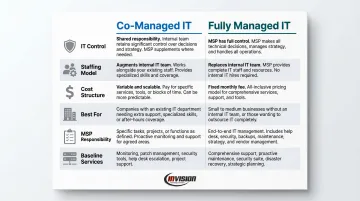
Pricing for both models varies based on company size, number of users and devices, service scope, and compliance requirements. Most businesses pay between $100–$400 per user per month for managed IT, though your actual cost depends on a custom assessment of your environment, team size, and service needs.
What Is Co-Managed IT?
Co-managed IT is a collaborative arrangement where a managed service provider (MSP) partners with a business's existing internal IT team — supplementing their capabilities rather than replacing them.
How the Model Works
The internal team and the MSP divide responsibilities based on skill gaps, workload, or specialization. A typical arrangement might look like this:
- Internal team handles: Day-to-day helpdesk tickets, user onboarding, on-site hardware issues
- MSP handles: Network security monitoring, compliance documentation, cloud infrastructure, patch management, and after-hours coverage
This division isn't fixed — the split adjusts over time as the business grows or its priorities shift.
Beyond filling gaps, co-managed clients gain access to the MSP's enterprise-grade tools — monitoring dashboards, ticketing systems, and documentation platforms that most internal teams couldn't justify purchasing independently.
The MSP's knowledge base also becomes an extension of your team, bringing current best practices and specialized expertise that would take years to build in-house.
The Problem It Solves
Even strong internal IT teams hit a ceiling. The Datto SMB Market Report found that 79% of SMBs identify security issues and technical support as their top IT challenges, while 72% struggle with the increasing complexity and cost of managing IT.
A single internal IT generalist can't realistically cover endpoint security, cloud migrations, compliance monitoring, and a full helpdesk queue — especially not during vacations or sick leave. Co-managed IT addresses those gaps without the cost or time commitment of hiring additional full-time staff.
Who Benefits Most from Co-Managed IT?
The ideal co-managed IT candidate is a business with one or more internal IT staff members who are capable but stretched thin.
Common fits include:
- Mid-sized businesses in regulated industries — healthcare practices managing HIPAA compliance, law firms with client data security requirements, accounting firms dealing with SOX or PCI-DSS
- Companies experiencing rapid growth — where IT complexity is outpacing the team's bandwidth
- Multi-location organizations — where consistent coverage across sites is difficult for a small internal team
- Businesses that want to retain institutional IT knowledge — and keep an internal resource who understands their specific systems and history
SMBs using co-managed IT report significantly higher satisfaction — 45% completely satisfied versus only 34% of those relying on internal-only IT.
What Is Fully Managed IT?
Fully managed IT means the MSP assumes complete responsibility for a business's entire IT environment. There's no internal IT department — the MSP functions as one.
How the Model Works
The MSP handles everything: helpdesk support, network monitoring, cybersecurity, patch management, backup and disaster recovery, vendor management, and strategic IT planning. For most small businesses, this looks like having an entire IT department available without carrying those people on payroll.
Providers monitor systems around the clock, catching issues before they become outages. InVision Technology Solutions runs its InWatch 24/7 monitoring system across servers, desktops, laptops, and network devices — maintaining 99.9% system uptime and an average response time of 5 minutes for managed clients.
Every client is assigned a dedicated team: a primary and secondary systems administrator, a technical manager, and an account manager.
The Real Cost Equation
The external cost of fully managed IT is higher than co-managed — but that comparison misses the full picture. Fully managed IT replaces internal IT staff costs entirely. Consider what a single internal hire actually costs:
- Median salary for a Computer User Support Specialist: $60,340/year (BLS, 2024)
- Total loaded cost (benefits, payroll taxes, tools): approximately $75,000–$85,000/year
- Plus: recruiting costs, training, management overhead, and zero coverage nights, weekends, or PTO
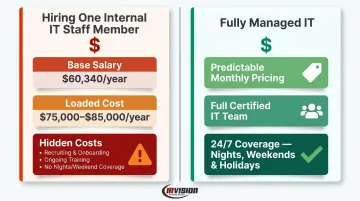
A fully managed IT arrangement replaces that overhead with predictable monthly pricing, a full team of certified specialists, and 24/7 coverage. For most small and mid-sized businesses, outsourcing comes out ahead.
Who Benefits Most from Fully Managed IT?
The fully managed IT candidate is a business without an internal IT department — or one where the owner or office manager is currently handling IT issues reactively.
Specific scenarios where it's the right call:
- Small businesses under 50 employees with no dedicated IT staff
- Companies in compliance-heavy industries — healthcare, finance, legal — that need consistent oversight and documentation
- Organizations that have already experienced a security incident and want comprehensive protection going forward
- Businesses where the owner is losing productive hours to IT problems that aren't getting fully resolved
47% of businesses with fewer than 50 employees allocate zero budget to cybersecurity, and 51% have no security measures in place at all. For those businesses, fully managed IT isn't just a convenience — it's a core risk management decision.
Which Model Is Right for Your Business?
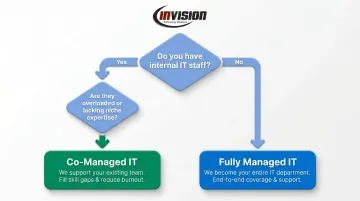
The decision comes down to four questions:
- Do you have internal IT staff?
- How much control do you want to retain over IT operations?
- What's your budget structure — can you absorb internal IT overhead, or do you need a single predictable monthly cost?
- What are your compliance and security requirements?
Choose co-managed IT if you already have internal IT staff who are good at what they do but overloaded, lacking niche expertise (cybersecurity, cloud, compliance), or unable to cover your full environment alone. Co-managed keeps your institutional knowledge in-house while giving your team the backup they need.
Choose fully managed IT if you have no dedicated IT staff, want to stop managing IT problems yourself, or need consistent 24/7 expert coverage without the overhead of hiring.
The Compliance Dimension
For businesses in regulated industries, that fourth question — compliance — often drives the decision more than any other factor.
Healthcare data breaches averaged $9.77 million in 2024 — nearly double the global average — and healthcare has held that record for 14 consecutive years. HIPAA Tier 4 penalties for unrectified neglect can reach $2.19 million per violation.
In Arizona specifically, cybercrime losses hit $337 million in 2024, with victim counts rising 61% from 2022 to 2024.
For regulated businesses in the Phoenix Metro area, inconsistent IT coverage isn't just an operational risk — it creates direct financial exposure.
Two Real-World Scenarios
Scenario A — Co-managed fit: A 75-person manufacturing firm in Mesa has one internal IT generalist managing everything from printer issues to network security. He's knowledgeable but stretched thin — endpoint security updates slip, backup monitoring is informal, and he hasn't taken a real vacation in years because there's no coverage when he's out.
A co-managed arrangement brings in an MSP to own security monitoring, compliance documentation, and after-hours coverage. He stays in the lead on day-to-day operations, keeping the institutional knowledge where it belongs.
Scenario B — Fully managed fit: A 20-attorney law firm in Scottsdale has no IT staff. The office manager handles IT issues as they surface, which means problems linger, systems go unpatched, and client data security is inconsistent.
Facing a cybersecurity audit, they need documented controls, 24/7 monitoring, and reliable helpdesk support — none of which they can build internally on a realistic timeline. Fully managed IT gives them an entire IT department from day one.
Conclusion
There's no universally better option between co-managed and fully managed IT. Co-managed empowers businesses that already have internal IT talent — extending their capabilities without dismantling what works. Fully managed IT gives businesses without an IT team complete, consistent coverage without building one from scratch.
If you're a Phoenix Metro business owner trying to sort out which model fits your situation, InVision Technology Solutions has been helping businesses work through exactly this decision since 2006. Serving industries from healthcare and legal to manufacturing and finance across Scottsdale, Phoenix, Mesa, and the surrounding area, InVision builds IT solutions around what your business actually needs rather than fitting you into a standardized package.
Reach out at 480-699-8077 or info@invisionaz.com for a no-pressure conversation about your current IT setup.
Frequently Asked Questions
What are co-managed IT services?
Co-managed IT is a hybrid model where an external MSP works alongside a business's existing internal IT team, supplementing their capabilities in defined areas. The MSP fills skill gaps, provides specialized tools, and extends coverage — without replacing the internal team or taking full ownership.
How much should managed IT services cost?
Pricing varies based on company size, number of users and devices, service scope, and compliance requirements. Most MSPs use flat-rate monthly pricing; industry ranges typically run $100–$400 per user per month. Request a custom assessment for an accurate quote based on your environment.
What is a CSP vs. MSP?
A CSP (Cloud Service Provider) delivers cloud-based infrastructure or software — such as Microsoft Azure or Microsoft 365. An MSP (Managed Service Provider) proactively manages and supports a business's overall IT environment. Many MSPs, including Microsoft-certified partners, are also authorized CSP resellers.
Do I need an in-house IT team to use co-managed IT services?
Yes — co-managed IT is designed for businesses that already have at least one internal IT staff member. The MSP fills gaps and supports that person rather than acting as the sole IT resource. If you have no internal IT staff, fully managed IT is the appropriate model.
Can a business switch from co-managed IT to fully managed IT over time?
Yes. Many businesses start with co-managed IT and transition to fully managed IT as internal IT roles change or the business grows. A good MSP evaluates your needs over time and adjusts the service model accordingly. InVision's flexible, no-contract structure makes that kind of shift easy to navigate without locking you into a model that no longer fits.
Is fully managed IT a better fit for small businesses than co-managed IT?
For small businesses without dedicated IT staff, yes. Fully managed IT provides complete coverage without requiring internal IT resources. Co-managed IT is better suited for businesses that already have IT staff in place and want to extend their capabilities, not replace them.