The instinct is often to hire someone. But a full-time IT employee costs $60,000–$90,000 in salary alone, before benefits and training. For a 15-person company, that math rarely works. The alternative — ignoring IT problems until they become crises — carries its own steep price in downtime, security incidents, and lost productivity.
This guide covers what your options actually are, what they realistically cost, which services matter most for small businesses, and how to evaluate providers without getting locked into the wrong fit.
Key Takeaways
- Small businesses can choose from break-fix, remote support, or fully managed IT — each with different cost structures and coverage levels
- Managed IT typically runs $150–$300 per user per month depending on service depth, making budgeting more predictable than break-fix billing
- The five services most small businesses need: help desk support, cybersecurity, data backup, network management, and cloud services
- Compare providers on SLA response times, industry experience, certifications, and whether contracts are flexible or required
- Switching providers mid-contract is disruptive — vet carefully upfront using the checklist in this guide
What Is Small Business IT Support?
Small business IT support is an arrangement where an external provider manages, monitors, and maintains your company's technology — networks, devices, software, and security — either on-demand or on an ongoing basis.
Key Delivery Models
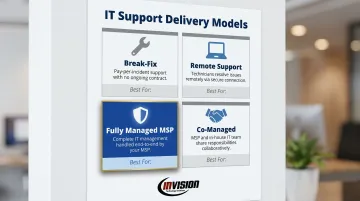
| Model | How It Works | Best For |
|---|---|---|
| Break-Fix | Pay per incident when something breaks | Businesses with minimal IT needs |
| Remote IT Support | Technicians access systems virtually to resolve issues | Companies needing fast, flexible coverage |
| Fully Managed IT (MSP) | Provider handles all IT functions proactively for a flat monthly fee | Businesses wanting predictable costs and maximum coverage |
| Co-Managed IT | MSP supplements an existing internal IT person or team | Mid-size businesses with in-house IT but coverage gaps |
The industry has largely moved away from break-fix. According to the 2024 Kaseya MSP Benchmark Survey, 65% of IT providers now operate as MSPs, while only 3% remain primarily break-fix shops. That shift reflects market reality: reactive support creates more downtime and more billing surprises than proactive management does.
Why Small Businesses Rely on External IT Support
That market shift has a straightforward explanation: hiring a single full-time IT employee means covering salary, benefits, training, and time-off — expenses most small businesses can't justify for one person who rarely covers cybersecurity, cloud platforms, and compliance all at once.
An MSP replaces that single hire with a full team of specialists, each with different certifications and vendor relationships, for a fraction of the cost. Phoenix Metro providers like InVision Technology Solutions take this further by assigning two dedicated engineers per client — so you get consistent familiarity with your environment backed by a deeper technical bench.
How Much Does IT Support Cost for a Small Business?
IT support costs vary based on business size, infrastructure complexity, industry compliance requirements, and coverage level. Understanding the pricing models first makes budgeting far more accurate.
What Drives Cost Differences
- Number of employees and devices — per-user and per-device pricing scales directly with headcount
- Infrastructure complexity — more servers, locations, or legacy systems mean more management overhead
- Industry compliance requirements — HIPAA for healthcare and dental, PCI DSS for financial services, data retention rules for legal firms
- Geographic location — labor costs vary by region
- Response time expectations — 24/7 coverage costs more than business-hours-only support
Pricing Models and Typical Ranges
Break-Fix (Hourly) Businesses pay only when something breaks. The Kaseya 2024 Benchmark Survey found 63% of break-fix providers charge $101–$200 per hour, with advanced security or consulting work reaching $150–$400 per hour. This works for businesses with minimal IT needs but creates unpredictable expenses and zero proactive coverage.
Per-User Monthly Pricing Most managed IT providers charge a flat monthly fee per employee. Current market rates:
- Standard managed IT: $150–$250 per user per month
- With advanced security and consulting: approximately $300 per user per month
- 51% of MSPs price at under $150 per user per month for basic tiers
This model is predictable and scales naturally as headcount grows.
All-Inclusive Flat Monthly Fee Some providers offer a single monthly rate covering all services for the business. A 35-person organization typically pays $3,500–$5,500 per month for fully managed IT; smaller businesses generally fall in the $1,000–$5,000 per month range depending on scope.
The Hidden Cost of Not Having IT Support
The actual cost of skipping IT support includes unplanned downtime, security breaches, and hours lost when non-IT staff troubleshoot technical problems. Those costs are harder to budget for than a monthly managed services fee.
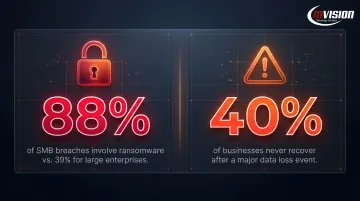
The Verizon 2025 Data Breach Investigations Report found ransomware present in 88% of SMB breaches, compared to just 39% for large enterprises. Small businesses carry disproportionate risk with far less internal capacity to absorb it.
Research also shows 40% of businesses never recover from a major data loss incident (a more defensible figure than the often-cited, officially debunked "60% closure" statistic). For most small businesses, that makes proactive IT support a continuity decision as much as an operational one.
What IT Services Do Small Businesses Actually Need?
Not every small business needs the same services. Priorities shift based on industry, team size, and how central technology is to daily operations. That said, five categories form the foundation for most.
Help Desk and Remote Support
Help desk is the first line of defense for daily technical friction — password resets, software errors, connectivity issues, email problems. Remote support allows technicians to resolve most of these without an on-site visit, cutting resolution times dramatically.
For small businesses without internal IT staff, help desk coverage is often the highest-frequency service they'll use. A provider answering calls within minutes (not hours) makes a tangible difference to daily productivity.
Cybersecurity
Cybersecurity is non-negotiable, full stop. 43% of cyberattacks target small and medium-sized businesses, and most SMBs lack the defenses to detect intrusions quickly.
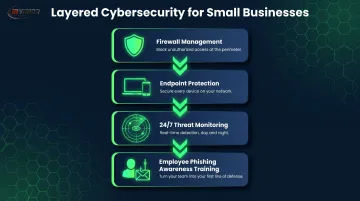
Core cybersecurity services your provider should cover:
- Firewall management — maintaining and updating network perimeter controls
- Endpoint protection — antivirus and malware detection across all devices
- 24/7 threat monitoring — continuous surveillance for anomalies and intrusions
- Employee phishing awareness training — human error drives nearly 60% of breaches (Verizon 2025 DBIR)
For businesses in regulated industries — healthcare, dental, legal, financial services — professional cybersecurity isn't optional. HIPAA mandates five specific technical safeguards for any system handling patient data: access controls, audit controls, integrity controls, person authentication, and transmission security. Missing any of them carries regulatory penalties, not just operational risk.
Data Backup and Disaster Recovery
Automated, offsite backups protect against ransomware, hardware failure, and human error. A disaster recovery plan ensures operations resume quickly when something does go wrong.
Two figures worth knowing:
- Only 31% of small businesses have a formal disaster recovery plan (U.S. Chamber Foundation)
- 94% believe they could recover from a disaster — a gap that tends to become obvious only after a breach or hardware failure
InVision uses Veeam and Barracuda Networks as backup platforms, with a stated goal of restoring clients within minutes, not hours or days. Recovery time commitment is the right question to press any provider on before you sign.
Network Management and Cloud Services
Network management means continuous monitoring of routers, switches, and connectivity — catching degradation before it becomes a full outage. For a business running on a single connection, the difference between proactive monitoring and reactive support is often a 15-minute fix versus a half-day disruption.
Cloud services — particularly Microsoft 365 — now function as core infrastructure for most small businesses. Remote access, secure file collaboration, scalable storage, and business email all run on platforms that require ongoing management, not just an initial setup. InVision holds Certified Office 365 Provider status, handling migrations and day-to-day M365 administration as a managed service.
How to Choose the Right IT Support Provider
Choosing a provider is more than comparing monthly fees. The right partner should match your industry, respond when it matters, and grow alongside your business.
Industry Experience and Certifications
An IT provider working in your specific industry understands both the technical environment and the compliance requirements. Ask for examples of clients in your sector and the compliance challenges they've addressed.
Certifications signal verified capability:
- Microsoft Silver Technology Partner / Certified Office 365 Provider — deep Microsoft ecosystem expertise
- Select Certified Cisco Partner / Cisco Security Specialized — advanced network and security capabilities
- Industry-specific experience in healthcare, dental, legal, or finance
Response Time and Availability
Every hour of downtime costs money — slow response makes it worse. Here are industry benchmarks for best-in-class MSP response:
| Priority | Best-in-Class Response |
|---|---|
| Critical (P1) | Within 15 minutes |
| Elevated (P2) | Within 30 minutes |
| Standard (P3) | Within 1–2 hours |
Ask providers for their documented SLA response times and whether 24/7 support is included or costs extra. InVision, for example, holds a contractual 1-hour response guarantee with an average actual response time of 5 minutes — ask any provider you're evaluating for that same level of documented specificity.
Scalability and Contract Flexibility
IT needs change as businesses grow. A provider that requires a full vendor switch when you add a location or change software creates unnecessary disruption. Look for:
- Service tiers that scale without renegotiation
- Month-to-month or no-commitment arrangements
- The ability to add or reduce services as needs evolve
InVision's no-service-commitment policy means clients can adjust or exit arrangements as their needs change, without penalties or forced renegotiation.
Local vs. Remote Support
Most day-to-day issues resolve remotely. Hardware installations, network cabling, and complex on-site troubleshooting still require physical presence. For Phoenix Metro businesses, a local provider means faster on-site dispatch and a team that understands the regional business environment.
InVision serves businesses across Scottsdale, Phoenix, Tempe, Chandler, Gilbert, Mesa, Glendale, and Yuma — with on-site availability including after-hours and weekends for emergencies.
Transparent Pricing
Surprise billing is a red flag. Before signing, ask specifically:
- What is and is not included in the monthly fee?
- Are there add-on fees for after-hours support, hardware replacement, or compliance-related work?
- How is scope of work defined and modified?
Providers who can't answer these questions clearly, or who bury answers in contract language, should raise concern. Predictable billing is one of the core reasons businesses move to managed IT — if a provider can't deliver that upfront, they won't deliver it later.
How InVision Technology Solutions Can Help
InVision Technology Solutions is a Scottsdale-based managed IT provider with nearly 20 years of experience serving businesses of all sizes across the Phoenix Metro area. The team handles compliance-specific configurations for regulated industries — including HIPAA-aligned setups for healthcare and dental practices, legal firms, and financial services.
Service differentiators:
- 5-minute average response time (SLA guarantees 1 hour; actual average is 5 minutes)
- 99.9% system uptime through InWatch, InVision's proprietary 24/7 network monitoring system
- Two dedicated engineers per client — a primary and secondary systems administrator who know your environment
- No long-term contracts — flexible arrangements with no service commitment required
- Upfront, transparent pricing with costs defined before any agreement is signed

Certifications:
- Microsoft Silver Technology Partner and Certified Office 365 Provider
- Select Certified Cisco Partner and Cisco Security Specialized
- Technology partnerships with Dell, HPE, VMware, Veeam, and Barracuda Networks
To talk through your IT needs, reach InVision at (480) 699-8077 or info@invisionaz.com.
Conclusion
The best IT support for a small business isn't the cheapest option or the most feature-heavy package. It's the one that fits your business's size, industry, growth trajectory, and budget — while actually responding when something goes wrong.
Those needs will also change. A provider that works for a 10-person firm in year one may not be the right fit at 40 employees — or when compliance requirements shift. Before you sign anything, look for a provider who:
- Monitors your systems proactively, not just after something breaks
- Communicates clearly about what's happening and why
- Plans ahead with you, not just for you
- Offers flexible engagement terms that match where your business is today
For Phoenix Metro businesses, InVision Technology Solutions has been doing exactly that since 2006 — with no-contract options, 24/7 monitoring, and a 5-minute average response time. If you're ready to talk through what IT support should look like for your business, reach out to the InVision team.
Frequently Asked Questions
How much does IT support cost for a small business?
Break-fix support runs $101–$200 per hour. Managed IT services cost $150–$300 per user per month depending on service depth, or $1,000–$5,000+ per month as an all-inclusive flat fee. Actual cost depends on business size, coverage level, and industry compliance requirements.
What is the average IT budget for a small business?
SMBs with 1–20 employees spend approximately $1,900 per employee on technology annually, more than double what larger organizations spend per head. IT spending for midsized firms averages around 3.1% of revenue. Managed IT services tend to deliver more value from that budget than reactive break-fix spending.
What IT services do small businesses need?
The five core categories are help desk support, cybersecurity, data backup and disaster recovery, network management, and cloud services. Priorities shift based on industry — regulated sectors like healthcare, dental, and legal require compliance-aligned configurations on top of standard services.
Can IT support be done remotely?
Most IT issues resolve remotely without an on-site visit: software errors, connectivity problems, user account issues, and security monitoring are all handled faster and at lower cost than dispatching a technician. On-site visits remain necessary for hardware installation, cabling, and complex infrastructure work.
How much does it cost to set up a network for a small business?
Network setup for a 10–50 employee business generally costs $5,000–$15,000, covering hardware, configuration, and cabling. Basic 10-device setups start around $3,000; multi-location or complex environments can exceed $20,000. Ongoing network monitoring is typically included in managed IT service agreements.
What is the best cybersecurity approach for a small business?
Effective small business cybersecurity combines layered protection: firewall management, endpoint detection and response, automated data backups, and employee phishing awareness training. For regulated industries like healthcare and legal, a managed security provider with documented compliance experience is a legal and operational requirement — not an optional upgrade.