The frustration usually triggers a question: is there a better way?
There is — but understanding it requires recognizing that IT support and managed services aren't just two price points. They're two fundamentally different philosophies about when technology help should arrive: after a problem, or before one.
That distinction has real consequences. According to Datto's research, the average cost of IT downtime for small and mid-sized businesses runs around $8,000 per hour. Choosing the wrong IT model doesn't just affect your budget — it affects how often you're exposed to that risk.
Key Takeaways
- IT support (break-fix) is reactive: you pay per incident when something breaks. Managed services is proactive, with a flat monthly fee covering continuous monitoring, maintenance, and security
- Break-fix suits businesses with minimal, occasional IT needs; managed services fits businesses that depend on technology daily
- Managed services includes 24/7 monitoring, cybersecurity, compliance support, and strategic IT planning — none of which come standard with break-fix
- With managed services, most issues get caught and fixed before they affect your business; with break-fix, you find out when something stops working
What Is IT Support?
IT support — often called break-fix or on-demand support — is exactly what it sounds like. Something breaks, you call someone to fix it, and you pay for that specific visit or repair. No ongoing relationship, no monitoring, no prevention.
According to TechTarget's definition, break-fix services are "rendered only when needed, typically after something breaks," with fees billed hourly or at a flat rate per service.
What IT support typically covers:
- Hardware failures (crashed drives, failed servers, broken equipment)
- Software errors and application troubleshooting
- Network outages and connectivity issues
- Device setup and user-facing technical problems
- One-time virus removal or data recovery
IT support resolves the immediate symptom — nothing more. It doesn't investigate root causes, implement preventive measures, or monitor for warning signs. Once the technician leaves, your systems are on their own until something breaks again.
When IT Support Makes Sense
Break-fix isn't a bad model for every situation. It works well for:
- Businesses with under 10 employees and minimal technology infrastructure
- Operations where occasional IT issues don't translate directly to lost revenue
- Companies with in-house IT staff who only need extra help with overflow work or specialized issues
For businesses that check these boxes, paying per incident may be more cost-effective than a monthly managed services subscription. Most Phoenix Metro businesses, though, outgrow this model before they notice — often when a costly outage or security incident makes the gap impossible to ignore.
What Are Managed IT Services?
Managed IT services flip the break-fix model entirely. Instead of waiting for problems, a managed service provider (MSP) takes ongoing responsibility for monitoring, maintaining, and securing your entire IT environment — for a predictable flat monthly fee.
The scope is significantly broader than anything break-fix covers by default.
Core services included in managed IT plans typically cover:
- 24/7 remote monitoring of servers, endpoints, and network devices
- Patch management and automated security updates
- Cybersecurity — endpoint protection, threat detection, firewall management
- Data backup and disaster recovery
- Cloud infrastructure management (Microsoft 365, Azure)
- SLA-backed helpdesk support
- Compliance support for HIPAA, PCI-DSS, SOX, and other frameworks
Beyond fixing problems, a quality MSP functions as a long-term technology partner — advising on infrastructure upgrades, cloud strategy, and IT planning aligned with your business goals. That advisory role is something a one-time repair vendor simply isn't positioned to provide.
According to CompTIA data, 65% of SMBs have already shifted from break-fix to managed IT services — meaning businesses still running on reactive support are increasingly in the minority.
The Financial Case for Managed Services
The flat-rate pricing model matters beyond convenience. Break-fix costs are structurally unpredictable — a single server failure or ransomware event can generate an invoice that exceeds months of managed service fees in one incident.
Those catastrophic incidents are precisely where the economics shift. CompTIA data shows over 80% of businesses using MSPs report cutting IT costs by up to 49%, with 13% saving more than 50%. The bigger gains come from avoided disasters, not just routine cost reductions.
For Phoenix Metro businesses evaluating that shift, InVision Technology Solutions structures managed services across four plan tiers — Basic, Bronze, Silver, and Platinum — built around their InWatch Monitoring Solution. Every client gets two dedicated engineers, a 5-minute average response time, and 99.9% system uptime, with no required service contract.
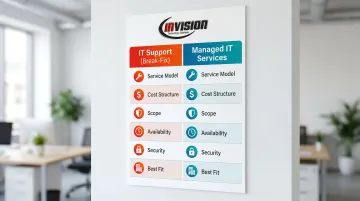
IT Support vs. Managed Services: At a Glance
| Dimension | IT Support (Break-Fix) | Managed IT Services |
|---|---|---|
| Service Model | Reactive; triggered by a reported problem | Proactive; continuous monitoring and prevention |
| Cost Structure | Pay-per-incident or hourly; unpredictable | Fixed monthly fee; fully predictable budgeting |
| Scope | Specific reported issues only | Network, security, cloud, backups, compliance, strategy |
| Availability | Typically business hours; emergency rates may apply | 24/7 monitoring and support included |
| Security | Reactive — addresses breaches after they occur | Ongoing patch management, threat detection, endpoint protection |
| Best Fit | Businesses under 10 employees with minimal IT needs | Businesses of 10+ employees, regulated industries, or operations requiring consistent uptime |
Key Differences That Matter for Your Business
Reactive vs. Proactive — and What That Costs You
IT support waits for you to report a problem. Managed services monitors your systems around the clock and resolves issues, often before you notice anything is wrong.
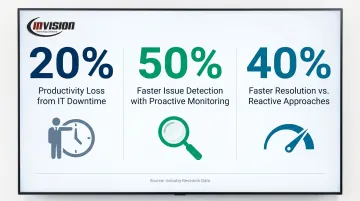
The operational difference is significant. IDC research shows IT downtime causes a 20% productivity loss, equating to over 100 hours per employee annually. Proactive monitoring reduces mean time to detect issues by 50% and resolves problems 40% faster than reactive approaches, according to Forrester data.
For Phoenix Metro businesses, that's the difference between a disruption you never knew about and a morning where half your staff can't access critical systems.
Cost Predictability
That downtime exposure connects directly to cost. Break-fix costs are uncapped: a single ransomware incident (increasingly common for SMBs) carries a mean recovery cost of $2.73 million according to Sophos's State of Ransomware 2024 report. Healthcare firms face mean recovery costs of $2.57 million; financial services firms average $2.58 million.
Managed services at $100–$250 per user per month looks very different when measured against that exposure.
Security and Compliance
43% of all cyberattacks target small businesses, and SMB breaches involving ransomware occur at 2.3 times the rate of larger organizations (Verizon DBIR). Break-fix handles security reactively — cleaning up after a breach. Managed services prevents breaches through:
- Continuous patch management and vulnerability monitoring
- Endpoint protection and threat detection
- Firewall management and network security
- Compliance monitoring for HIPAA, SOX, PCI-DSS, and Gramm-Leach-Bliley Act
For Phoenix Metro businesses in healthcare, legal, and financial services, this isn't optional. HIPAA violations alone carry penalties from $141 to $2.13 million per violation. InVision supports HIPAA compliance for medical and dental practices and financial regulation compliance (SOX, PCI-DSS) for accounting and financial firms. These frameworks require continuous oversight — not emergency fixes after the fact.
Scalability and Strategic Alignment
As a business grows, break-fix becomes increasingly untenable. Each new employee, device, or location is another variable that generates unpredictable support costs. Managed services absorbs that growth within the existing relationship and pricing structure.
Beyond absorbing growth, managed services provides technology planning that break-fix never touches:
- Advises on infrastructure investments and hardware lifecycle
- Guides cloud strategy and migration decisions
- Aligns IT direction with your business goals
Your MSP functions as a technology partner, not just a repair service.
Which Model Fits Your Situation?
Choose IT Support If:
- Your business has fewer than 10 employees
- Technology plays a limited role in daily revenue generation
- You have capable in-house IT staff who need only occasional supplemental help
- Your operations can absorb unplanned downtime without significant financial impact
Choose Managed Services If:
- Your team depends on technology to serve clients daily
- You've experienced repeat IT disruptions in the past 12 months
- You handle sensitive data — patient records, financial data, legal files
- Your industry has regulatory compliance requirements
- You want predictable IT costs and a technology partner, not a repair vendor
Questions to ask yourself:
- How many hours of downtime can your business absorb before revenue is affected?
- Have you experienced a cybersecurity incident or near-miss in the past two years?
- Are your IT costs unpredictable month to month?
- Is your team spending time on IT problems instead of core business work?
A Real-World Transition: Arizona Behavioral Health
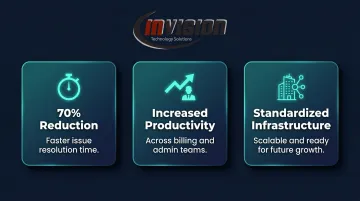
Resilient Health, an Arizona behavioral health provider operating 10 locations, ran on fragmented, reactive IT infrastructure that caused frequent disruptions affecting staff and patient care. Legacy phone systems and inconsistent internet service created operational bottlenecks across locations.
After transitioning to managed services, Resilient Health saw measurable results across the board:
- 70% reduction in issue resolution time
- Increased productivity across billing and administrative teams
- Standardized infrastructure positioned to support future growth
Ready to Talk It Through?
If your Phoenix Metro business is still running on reactive IT support, InVision Technology Solutions offers a straightforward conversation about whether managed services makes sense for your specific situation. There's no pressure and no required service commitment. InVision has served Phoenix Metro businesses since 2006 without locking clients into long-term contracts — the same approach applies here.
Call (480) 699-8077 or email info@invisionaz.com to start the conversation.
Conclusion
Neither model is universally better. IT support has a legitimate role for businesses with minimal technology dependency and very limited infrastructure. But for any Phoenix Metro business that relies on technology to serve clients, protect sensitive data, or stay competitive, managed services provides a level of coverage and predictability that reactive support structurally cannot match.
The real question is what an unplanned outage, a security breach, or a week of degraded performance would actually cost your business. For most Phoenix Metro companies, that number is far higher than the monthly cost of proactive coverage.
That's where managed services — and a provider like InVision Technology Solutions, which has supported local businesses across healthcare, legal, and professional services for nearly 20 years — makes a measurable difference. Reactive IT waits for something to break. Managed services works to ensure it doesn't.
Frequently Asked Questions
What does IT support do?
IT support (break-fix) responds to specific technical problems after they occur — hardware failures, software errors, network outages — on an ad-hoc, per-incident basis. It does not include ongoing monitoring, patch management, or any form of preventive maintenance.
What is the difference between managed IT services and IT support?
Managed IT services is proactive and subscription-based, covering continuous monitoring, security, and maintenance for a fixed monthly fee. IT support is reactive and pay-per-incident. The fundamental difference: managed services catches and resolves many issues before you notice them, while break-fix support only engages after you report a problem.
Can a business use both IT support and managed services?
Some businesses use an MSP for ongoing oversight while retaining access to specialized on-demand help. In practice, most managed service agreements already include the equivalent of IT support within the plan scope, making separate break-fix arrangements redundant for most clients.
Is managed IT more cost-effective than break-fix IT support?
Managed services carries a higher predictable monthly cost, but typically delivers better cost efficiency over time. The savings come from preventing expensive outages, data breaches, and emergency callouts that can far exceed months of managed service fees in a single incident.
What types of businesses benefit most from managed IT services?
Businesses in regulated industries (healthcare, legal, finance), companies with 10 or more employees, businesses with remote teams, and any organization where IT downtime directly affects revenue or client service tend to gain the most value from managed services.
How do I know when it's time to switch from IT support to managed services?
Watch for repeat disruptions, unpredictable IT costs, a recent cybersecurity incident, or growing compliance requirements (HIPAA, PCI-DSS, SOX). If your team is spending more time managing IT problems than running your business, that's the clearest signal of all.