The numbers reflect this reality. Ransomware attacks increased by nearly 20% in 2024, and IBM's 2025 Cost of a Data Breach report puts the global average breach cost at $4.4 million. For a 50-person company without a security operations team, that figure isn't just painful — it's potentially fatal to the business.
The typical response — layering a standalone firewall here, a separate antivirus there, a disconnected VPN somewhere else — creates exactly the coverage gaps attackers look for. 65% of organizations report too many security tools, and 53% say those tools can't integrate, hampering visibility and slowing incident response.
Unified Threat Management (UTM) addresses this directly. This guide covers what UTM is, which platforms lead the mid-market in 2026, and how to choose the right one for a 26–150 person organization.
Key Takeaways
- UTM consolidates firewall, antivirus, IDS/IPS, VPN, and web filtering into one managed platform — ideal for teams without dedicated security staff
- Top UTM solutions for mid-size businesses in 2026: Fortinet FortiGate, Cisco Meraki MX, Sophos XGS, WatchGuard Firebox, and SonicWall TZ
- Always size for UTM throughput, not headline firewall throughput; real-world performance drops 50–80% once IPS, SSL inspection, and antivirus run together
- Hardware costs range from $700–$2,500 depending on model; annual subscriptions add 20–40% of hardware cost per year
- Working with a certified local IT partner cuts misconfiguration risk and accelerates time-to-protection
What Is UTM and Why Mid-Size Businesses Need It in 2026
How UTM Consolidates Network Security
UTM is a network security appliance or cloud-managed platform that integrates multiple security functions under one management console: stateful firewall, antivirus/anti-malware, intrusion detection and prevention (IDS/IPS), VPN, web and content filtering, and application control. Instead of separate licensing agreements, separate management dashboards, and separate vendor relationships for each function, everything runs from one interface.
NIST SP 800-41 Rev.1 formally establishes this multi-function integration model as the foundational framework for network security architecture — making UTM a recognized standard, not a niche workaround.
Why Lean IT Teams Rely on UTM
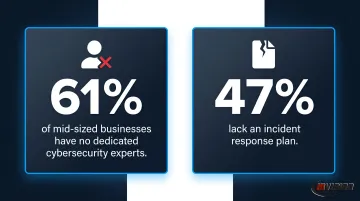
A 2024 mid-market study found 61% of mid-sized businesses have no dedicated cybersecurity experts and 47% lack an incident response plan. Managing five separate security products across a lean IT team — each with its own update cycles, alert queues, and support contracts — creates compounding overhead that most mid-size shops can't absorb.
A single UTM appliance with unified policy management eliminates that burden. One platform, one renewal, one place to investigate alerts.
UTM as a Compliance Foundation
For mid-size businesses in regulated industries, UTM isn't optional — it's foundational. Two of the most common frameworks mid-size businesses face each have specific technical mandates UTM directly addresses:
- HIPAA (45 CFR 164.312): Requires access controls, audit logs, integrity mechanisms, and encrypted transmission — all native UTM capabilities
- PCI-DSS Requirement 1: Mandates network security controls for any environment handling cardholder data
UTM platforms centralize the logging, access control, and VPN encryption these frameworks require — replacing the manual effort of pulling compliance evidence from multiple disconnected systems.
Best UTM Solutions for Mid-Size Businesses in 2026
These solutions were evaluated on real-world UTM throughput, management simplicity for non-specialist IT teams, vendor support quality, scalability, and three-year total cost of ownership. Marketing claims were set aside — actual performance specs and deployment realities drove the rankings.
Fortinet FortiGate Mid-Range Series (60F / 80F / 100F)
FortiGate is one of the most widely deployed UTM platforms globally, with mid-range appliances designed for networks of 25–200 users. Fortinet's proprietary ASIC-based Security Processing Units (SPUs) maintain high UTM throughput without the performance degradation that software-based inspection typically causes.
Key differentiators for mid-size buyers:
- Integrated SD-WAN eliminates the need for a separate WAN optimization appliance
- Fortinet Security Fabric shares threat intelligence across all connected devices in real time
- FortiManager provides centralized policy management that scales cleanly as the business adds locations
- Recognized as a Gartner Magic Quadrant Leader for Network Firewalls
| Specification | FortiGate 80F |
|---|---|
| Firewall Throughput | 10 Gbps (IPv4) |
| UTM / Threat Protection Throughput | 0.9 Gbps |
| IPS Throughput | 1.4 Gbps |
| SSL-VPN Users | Up to 200 (tunnel) |
| Recommended Users | 50–150 |
| Key Features | Firewall, IPS, antivirus, web filtering, application control, SSL inspection, integrated SD-WAN, FortiSandbox cloud integration |
| Approximate Hardware Cost | $800–$1,500 (mid-range models); annual UTP or ENT subscription required |
Verify current FortiGate pricing with your reseller before purchasing.
Cisco Meraki MX Series (MX67 / MX68 / MX85 / MX95)
Meraki MX is a widely adopted cloud-managed security and SD-WAN platform built for mid-size businesses. All configuration, monitoring, and firmware updates happen through Cisco's cloud dashboard — no CLI management, no on-site engineer required for routine changes.
This makes it a strong fit for organizations without a full-time network specialist. Automatic threat signature updates, seamless Microsoft 365 and Azure AD integration for identity-based policy enforcement, and native SD-WAN cover the core needs of hybrid and multi-site workforces.
As a Select Certified Cisco Partner, InVision Technology Solutions can help Phoenix Metro businesses evaluate, procure, and deploy Meraki MX appliances with hands-on local support from certified engineers.
| Specification | MX85 / MX95 |
|---|---|
| Firewall Throughput | MX85: 750 Mbps / MX95: 2 Gbps |
| Site-to-Site VPN Throughput | 800 Mbps (MX95) |
| Recommended Users | MX85: 50–100 / MX95: up to 500 |
| Key Features | Stateful firewall, IDS/IPS, content filtering, Advanced Malware Protection (AMP), Auto VPN, SD-WAN, cloud-managed dashboard |
| Licensing | Subscription-based (Enterprise or Advanced Security license required for full UTM features) |
Meraki MX requires an active subscription license for operation. Research current pricing tiers before specifying.
Sophos XGS Series (XGS 107 / 116 / 126 / 136)
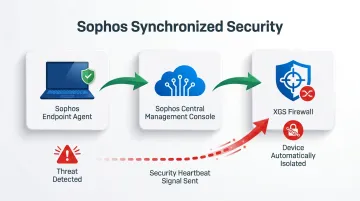
Sophos XGS is engineered for compliance-sensitive industries. Its "Synchronized Security" architecture allows the firewall to communicate directly with Sophos endpoint agents installed on company devices. When an endpoint detects a threat, the firewall automatically isolates that device — no manual intervention required.
Standout capabilities for mid-size buyers in healthcare or legal:
- Xstream TLS inspection maintains near-full throughput under heavy SSL decryption load
- Sophos Central unifies firewall, endpoint, and email security under one cloud login
- User Threat Quotient dashboard provides per-user risk visibility without manual log analysis
| Specification | XGS 136 |
|---|---|
| Firewall Throughput | ~2.3 Gbps |
| IPS Throughput | ~340 Mbps |
| Recommended Users | 50–100 |
| Key Features | Stateful firewall, IPS, antivirus, Xstream TLS inspection, web filtering, application control, SD-WAN, Synchronized Security with endpoint |
| Approximate Hardware Cost | $500–$900 (XGS 107/116); annual Sophos Central subscription required |
Confirm throughput figures against the current Sophos datasheet before finalizing sizing.
WatchGuard Firebox M Series (M290 / M390 / M590)
WatchGuard positions the Firebox M Series specifically for mid-size businesses and managed service providers. The Total Security Suite bundles every major UTM service — IPS, antivirus, DNS filtering, application control, APT Blocker sandbox, and MFA via WatchGuard AuthPoint — into a single annual subscription with predictable pricing.
The WatchGuard Dimension logging tool converts raw network traffic data into heat maps and top-user reports automatically, without additional configuration. For IT generalists managing multiple responsibilities, that saves hours of manual log analysis each week.
| Specification | Firebox M390 |
|---|---|
| Firewall Throughput | 18 Gbps |
| UTM Full Scan Throughput | 2.4 Gbps |
| Recommended Users | Up to 250 |
| Key Features | Stateful firewall, IPS, antivirus, DNSWatch, application control, spamBlocker, APT Blocker sandbox, AuthPoint MFA integration |
| Approximate Hardware Cost | $900–$1,200 (M290); Total Security Suite subscription adds annual per-device licensing |
AuthPoint MFA bundling varies by subscription offer — confirm commercial terms with your reseller.
SonicWall TZ Series (TZ470 / TZ570 / TZ670)
SonicWall TZ is the accessible entry point for mid-size businesses migrating from entry-level appliances. Upper TZ models deliver genuine multi-gigabit UTM performance at price points below most competing mid-market platforms. The Zero-Touch Deployment capability allows remote office rollouts without an on-site technician — useful for businesses with satellite locations.
Differentiating features worth noting:
- Real-Time Deep Memory Inspection (RTDMI) catches advanced malware that hides in system memory to evade traditional sandbox analysis
- SonicWall Network Security Manager (NSM) provides centralized policy and reporting across multiple appliances
- TZ670 supports multi-gigabit SFP+ ports for higher-bandwidth environments
| Specification | TZ570 |
|---|---|
| Firewall Throughput | 4.0 Gbps |
| Threat Prevention Throughput | 2.0 Gbps |
| IPS Throughput | 2.5 Gbps |
| Recommended Users | Up to 150 |
| Key Features | Stateful firewall, RTDMI, IPS, antivirus, content filtering, application control, SSL inspection, Zero-Touch Deployment |
| Approximate Hardware Cost | $700–$1,000 (TZ470); Advance or Premier Protection subscription required for full UTM features |
How to Choose the Right UTM Solution
The Throughput Mistake Most Buyers Make
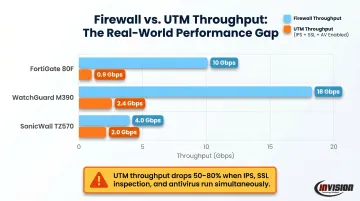
The most common selection error: choosing an appliance based on headline firewall throughput while ignoring UTM throughput — the speed with all security services running simultaneously.
The gap is significant. Look at these real figures from vendor datasheets:
| Model | Firewall Throughput | UTM / Threat Protection Throughput |
|---|---|---|
| Fortinet FortiGate 80F | 10 Gbps | 0.9 Gbps |
| WatchGuard Firebox M390 | 18 Gbps | 2.4 Gbps |
| SonicWall TZ570 | 4.0 Gbps | 2.0 Gbps |
When IPS, SSL inspection, and antivirus all run simultaneously, throughput can drop 50–80% below the headline number. Size for your actual UTM throughput against peak concurrent user counts, and build in headroom for growth.
Additional Evaluation Criteria
Beyond throughput, weight these factors in your decision:
- Management complexity — does your internal IT team have the expertise to manage this platform day-to-day, or will it require dedicated security staff?
- Compliance readiness — does the platform generate audit-ready logs for HIPAA, PCI-DSS, or NIST frameworks without custom configuration?
- Three-year total cost of ownership — hardware is a one-time purchase, but subscriptions recur annually and typically represent 60–80% of total spend over three years
- Can you add appliances or step up to a higher model tier without migrating configurations from scratch? Factor this in before committing to a platform.
- Deployment and support access — misconfigured UTM appliances are common; confirm certified local support is available before purchase
Matching Platform to Organization Type
With those criteria in hand, most buyers find that their organization profile naturally points to one or two strong candidates:
- Cloud-first or hybrid workforce with limited IT staff → Cisco Meraki MX (cloud-managed, minimal on-premise administration)
- Healthcare or legal with strict compliance requirements → Sophos XGS (Synchronized Security, per-user risk visibility)
- Multi-site mid-size business prioritizing SD-WAN → Fortinet FortiGate (integrated SD-WAN, Security Fabric)
- WatchGuard Firebox M Series works well for budget-conscious buyers who want predictable subscription costs — its Total Security Suite bundles everything into one annual fee
- Remote office rollout requiring Zero-Touch deployment → SonicWall TZ Series
Conclusion
Choosing a UTM platform is not a one-size-fits-all decision. A cloud-managed Meraki MX suits a 40-person professional services firm with a hybrid workforce differently than a FortiGate 100F suits a 120-person manufacturer with IoT devices on the same network segment. Getting that match wrong means paying for throughput you don't need, or deploying an appliance that chokes under real-world load.
Before you commit, evaluate on three key criteria:
- Three-year TCO, not hardware sticker price
- Internal management capacity — whether your team can own the platform or needs managed support
- Compliance reporting — confirm it meets your specific regulatory obligations before purchasing
If you'd rather not work through those tradeoffs alone, InVision Technology Solutions can help. Serving Phoenix Metro businesses for nearly 20 years as a Select Certified Cisco Partner with Cisco Security Specialized credentials, InVision offers network security assessments to match your environment to the right UTM platform — whether that's Cisco Meraki MX or any of the other solutions covered in this guide. Contact InVision at (480) 699-8077 or info@invisionaz.com to schedule your assessment.
Frequently Asked Questions
What is the difference between a UTM and a firewall?
A traditional firewall controls traffic based on port and protocol rules. A UTM extends that baseline with integrated antivirus, IDS/IPS, web filtering, VPN, and application control — consolidating those functions into a single managed device rather than requiring separate tools for each.
What is the best UTM for mid-size businesses in 2026?
Fortinet FortiGate mid-range models and Cisco Meraki MX are consistently strong choices, balancing performance with manageability. The best fit depends on whether your organization prioritizes on-premise hardware performance (FortiGate) or cloud-managed simplicity (Meraki MX).
What are the best budget-friendly UTM options for mid-size businesses?
SonicWall TZ Series and WatchGuard Firebox M Series offer genuine multi-function UTM protection with hardware starting below $1,500. WatchGuard's Total Security Suite provides especially predictable all-in pricing. When comparing options, check UTM throughput figures, not just the upfront hardware cost.
What UTM features matter most for mid-size businesses?
Prioritize IDS/IPS, SSL/TLS inspection, centralized cloud management, built-in VPN for remote workers, and compliance reporting. Web filtering and application control add meaningful productivity and security value and are typically included in bundled subscription tiers without significant additional cost.
How much should a mid-size business budget for a UTM solution?
Plan for hardware costs of $700–$2,500 depending on user count and model, plus annual subscription fees that typically run 20–40% of hardware cost per year. Over three years, subscriptions often exceed the hardware cost. Factor that into your total cost of ownership comparison before committing to a vendor.
Can a managed IT provider deploy and manage a UTM solution?
Yes. A certified provider handles appliance selection, initial configuration, firewall rule tuning, firmware updates, and ongoing threat log monitoring. This reduces misconfiguration risk (one of the most common causes of security gaps) and lets internal staff focus on operations instead of security management.