
Introduction
Network downtime carries a direct price tag. According to the Uptime Institute's 2024 outage analysis, 54% of organizations reported their most recent significant outage cost more than $100,000, with 16% exceeding $1 million.
Networks have also grown far more complex. Hybrid cloud deployments, remote workforces, multi-site infrastructure, and dozens of third-party SaaS tools have replaced the relatively simple on-premises environments IT teams managed a decade ago. Keeping tabs on all of it manually isn't realistic anymore.
This guide covers the best network monitoring tools available in 2026, what separates them, and how to decide whether managing a tool in-house or partnering with a managed IT provider makes more sense for your organization.
Key Takeaways
- Network monitoring tools give IT teams real-time visibility into device health, traffic, uptime, and security
- The right tool depends on your network size, budget, team expertise, and deployment preference
- Top tools in 2026 include SolarWinds NPM, PRTG, Auvik, Zabbix, and Datadog, each suited to different environments and team sizes
- Evaluate tools on scalability, alerting quality, cloud support, pricing model, and ITSM integration
- For SMBs without dedicated IT staff, a managed IT partner often delivers more value than any standalone monitoring tool
What Is Network Monitoring and Why Does It Matter in 2026?
Cisco defines network monitoring as providing administrators real-time information on whether a network runs optimally and identifying deficiencies — tracking traffic, bandwidth utilization, and uptime across devices.
In practice, that breaks down into four distinct monitoring types:
- Availability monitoring — tracks uptime and detects device or link failures against SLA targets
- Performance monitoring — catches degradation in latency, packet loss, and bandwidth before users notice
- Traffic monitoring — identifies bandwidth hogs, unusual application behavior, and congestion points
- Configuration monitoring — flags unauthorized device setting changes that can introduce vulnerabilities or compliance gaps
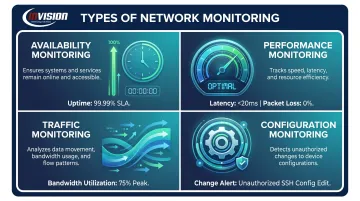
A tool that only covers availability will miss performance issues that don't cause outages but still frustrate users — and skipping configuration monitoring leaves you blind to the drift that quietly creates security exposure over time. The right tool covers all four.
The sections below assess the leading tools against each category, evaluated for reliability, scalability, ease of use, and fit across SMB, mid-market, and enterprise environments.
Best Network Monitoring Tools in 2026
These tools were selected based on market presence, feature depth, pricing transparency, deployment flexibility, and fit across different organization sizes.
SolarWinds Network Performance Monitor (NPM)
SolarWinds NPM is an established platform built for mid-to-large IT teams managing complex, multi-vendor environments. Its SNMP diagnostics go deep, automatic node discovery maps your network without manual effort, and the NetPath feature provides hop-by-hop visualization of network paths — making it much faster to isolate where a problem actually lives rather than guessing.
Key differentiators include broad multi-vendor device support, a Quality of Experience dashboard, customizable alerting with multiple notification channels, and tight integration with the broader SolarWinds product suite for teams that want unified IT management.
| Attribute | Details |
|---|---|
| Pricing Model | Element-based (nodes, interfaces, or volumes); subscription and perpetual options available — pricing via quote |
| Best For | Mid-to-large enterprises with complex, multi-vendor network environments |
| Key Strength | Advanced diagnostics, NetPath hop visualization, and robust alerting engine |
PRTG Network Monitor
PRTG, built by Paessler, has earned its reputation through approachable setup and sensor-based licensing that scales cleanly. It supports SNMP, WMI, NetFlow, REST API, SSH, and packet sniffing for devices that don't support standard flow protocols — covering most environments without additional tools.
The free tier (up to 100 sensors) gives smaller teams a genuine on-ramp. Paid tiers scale from $200/month for 500 sensors up through larger deployments. The drag-and-drop Map Designer, customizable alert schedules, alert dependency settings to prevent fatigue, and mobile apps for iOS and Android make PRTG a practical choice for IT teams that need visibility without a lengthy implementation project.
| Attribute | Details |
|---|---|
| Pricing Model | Sensor-based; free up to 100 sensors; paid from $200/month (500 sensors) |
| Best For | SMBs and mid-market teams wanting easy deployment and visual dashboards |
| Key Strength | Ease of setup, flexible alerting, and broad protocol support |
Auvik
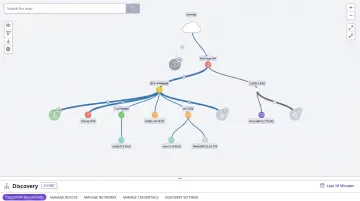
Auvik takes a cloud-native approach that eliminates the need for on-premises monitoring servers. Its automated discovery, real-time topology mapping across Layer 1, Layer 2, and Layer 3, and configuration backup/comparison features make it particularly strong for MSPs and mid-size IT teams that need fast deployment without extensive pre-configuration.
Out-of-the-box alerts deliver immediate visibility, and automated network documentation reduces the manual work that tends to fall through the cracks in busy IT departments. The tradeoff: Auvik focuses on network devices and offers less depth for server or application monitoring. It was named a leader across G2's Winter 2026 Network Management grids for small-business, mid-market, and enterprise categories.
| Attribute | Details |
|---|---|
| Pricing Model | Asset-based SaaS pricing; tailored per environment — verify current tiers with Auvik |
| Best For | MSPs and mid-size IT teams prioritizing fast deployment and automated documentation |
| Key Strength | Automated discovery, topology mapping, and configuration backup comparison |
Zabbix
Zabbix is fully open-source — no licensing fees, no hidden costs, no per-device charges. Released under AGPLv3, it supports agent-based and agentless monitoring across networks, servers, and applications, with a strong template and automation framework that lets technically capable teams build exactly what they need.
The tradeoff is real: Zabbix's interface hasn't kept pace with modern UX standards, and getting the most out of it requires real technical depth. Teams without that expertise often end up with a partially configured deployment that provides less coverage than they expected. For teams that can manage it, though, the cost advantage and scalability at large environments are difficult to match.
| Attribute | Details |
|---|---|
| Pricing Model | Free and open-source; optional paid support contracts available |
| Best For | Technical teams seeking a cost-free, highly customizable monitoring platform |
| Key Strength | No licensing costs, deep extensibility, and scalability across large infrastructures |
Datadog
Datadog covers more ground than most monitoring tools — network flows, application performance, cloud infrastructure, logs, and security all in a single interface with AI-powered alerting. Its 1,000+ integrations span virtually every cloud service, SaaS tool, and infrastructure component in common use.
Pricing is modular: Infrastructure Monitoring from $15/host/month, Cloud Network Monitoring from $5/host/month, Network Device Monitoring at $7/device/month. Teams can adopt only what they need — though costs compound quickly as modules and data volumes increase. Datadog is best suited to cloud-first organizations that need full-stack observability rather than pure network monitoring.
| Attribute | Details |
|---|---|
| Pricing Model | SaaS, modular per-host/per-feature pricing — model multiple scenarios before committing |
| Best For | Cloud-first teams needing full-stack observability across distributed infrastructure |
| Key Strength | Breadth of coverage, AI-driven alerting, and cloud integration depth |
How to Choose the Right Network Monitoring Tool
The most common mistake IT managers make is choosing a tool based on feature count rather than fit. A powerful tool that's misconfigured, too complex to manage actively, or misaligned with your licensing model provides little real protection and often just adds noise.
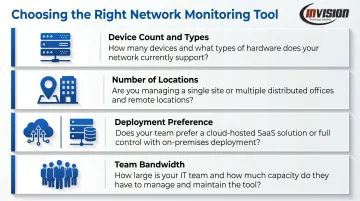
Start With Your Environment
Build a clear picture of what you're actually monitoring:
- Device count and types — routers, switches, firewalls, servers, cloud instances
- Number of locations — single site vs. multi-site vs. hybrid cloud
- Deployment preference — SaaS (Auvik, Datadog) vs. on-premises (Zabbix, SolarWinds NPM, PRTG)
- Team bandwidth — who will configure, maintain, and respond to alerts daily?
Factor in Growth
A tool that works cleanly for 50 devices today may become expensive or unmanageable at 300 devices without flexible licensing. PRTG's sensor-based model scales predictably; SolarWinds NPM's element-based tiers require careful inventory before committing. Datadog's modular pricing requires scenario modeling as you add hosts and features.
Verify Protocol and Integration Support
Confirm the tool supports your existing vendors — Cisco, Microsoft, Dell, HPE — and integrates with your ITSM or ticketing system. Automated incident creation from monitoring alerts is one of the highest-value configurations most teams underuse. That integration also affects your total cost of ownership in ways licensing comparisons alone won't reveal.
Calculate Total Cost of Ownership
Free or low-cost tools often carry hidden costs:
- Staff time for initial configuration
- Ongoing maintenance and template updates
- Training for new team members
- Support contracts when issues arise
Zabbix has no licensing cost but can require significant engineering time to operate well. PRTG's paid tiers include support. Broadcom research notes that 98% of organizations use or plan to use cloud infrastructure — verify your chosen tool supports multi-cloud visibility in practice, not just on the feature list.
When to Consider a Managed IT Partner for Network Monitoring
Monitoring tools only work when someone responds to their alerts. An alert that fires at 2 a.m. on a Saturday and sits unacknowledged until Monday morning hasn't prevented anything — it's just logged a problem after the damage was done.
For businesses without dedicated IT staff, this is the core issue. CompTIA's IT Industry Outlook 2025 reports that 37% of channel firms say their SMB customers have committed to an MSP specifically to access advanced technical skills without hiring. U.S. network administrators earn a median of $96,800 annually; network architects earn $130,390. Around-the-clock coverage from a single hire simply isn't realistic.
A managed IT partner closes that gap — handling the tool, the configuration, and the response, around the clock.
InVision Technology Solutions, a Select Certified Cisco Partner serving Phoenix Metro businesses since 2006, provides 24/7 network monitoring through its InWatch monitoring platform. Key performance figures:
- 5-minute average response time to alerts
- 99.9% system uptime across client environments
- 11.9-minute average resolution time
- 245,765 threats blocked through continuous monitoring

InVision's managed monitoring is particularly well-suited for businesses in healthcare, legal, and financial services — industries where uptime and compliance are non-negotiable but hiring full-time network engineers isn't financially practical. HIPAA-aligned monitoring for medical practices and SOX/PCI DSS-aligned oversight for financial firms are core service areas.
For Phoenix Metro businesses evaluating whether managed monitoring fits their situation, InVision offers a free network security assessment — a concrete first step toward understanding your current exposure before committing to a tool or a managed service.
Conclusion
The best network monitoring tool is the one that matches your team's actual capabilities, your network's complexity, and your budget — not the one with the longest feature list. Here's the short version:
- SolarWinds NPM — large, multi-vendor environments with dedicated IT staff
- PRTG and Auvik — SMB and mid-market teams that need fast deployment
- Zabbix — technically strong teams willing to invest setup time
- Datadog — cloud-first organizations that need full observability coverage
Use free tiers and pilots before committing. When modeling licensing costs, use your actual device inventory — not an optimistic estimate.
If managing these tools in-house isn't the right fit for your team, that's a legitimate conclusion too. InVision Technology Solutions works with Phoenix Metro businesses that need expert network oversight without the operational burden — with 24/7 monitoring, two dedicated engineers per client, a 5-minute average response time, and no long-term contract required. Reach out at (480) 699-8077 or info@invisionaz.com to talk through your environment.
Frequently Asked Questions
What are the leading network monitoring tools for IT managers in 2026?
The most widely adopted tools include SolarWinds NPM, PRTG, Auvik, Datadog, and Zabbix. The best choice depends on your network size, team expertise, and whether you prefer a SaaS platform or an on-premises deployment.
What is the difference between agent-based and agentless network monitoring?
Agent-based monitoring installs software on each device for deeper metrics and local data processing. Agentless monitoring uses protocols like SNMP and WMI to gather data remotely without installation, making it simpler to deploy but lighter on detail. Most modern tools support both methods.
How much do network monitoring tools typically cost?
Pricing ranges from free (Zabbix) to PRTG's $200/month entry tier (500 sensors) to Datadog's modular per-host pricing. SolarWinds NPM and Auvik provide pricing via quote. Factor in configuration time and ongoing maintenance costs when calculating total cost of ownership.
Can small businesses benefit from network monitoring tools?
Network monitoring helps SMBs catch problems before they become outages, but it's worth weighing whether a standalone tool fits your team. If internal staff can configure and respond to alerts, a dedicated tool makes sense. If not, a managed IT service that bundles monitoring into the engagement is often more practical.
What features should I prioritize when evaluating a network monitoring tool?
Focus first on real-time alerting, automatic device discovery, scalability, hybrid and cloud environment support, and integration with your existing ticketing or ITSM system. These features drive the most day-to-day operational value.
Is it better to manage network monitoring in-house or outsource it to an MSP?
In-house management works when your IT team can monitor and respond to alerts around the clock. For businesses that need 24/7 coverage without the cost of dedicated network engineers, outsourcing to an MSP is typically the better fit. This is especially true in regulated industries like healthcare or legal, where after-hours response is non-negotiable. MSPs like InVision Technology Solutions bundle 24/7 monitoring into their managed service plans, so coverage is continuous without requiring you to staff for it.