
The cost gap between building your own data center infrastructure and outsourcing it to a managed provider is substantial. But the wrong decision doesn't just cost money upfront. Building locks you into significant capital commitments and ongoing operational overhead. Outsourcing creates recurring costs that compound over time. Neither path is inherently right — it depends on your specific situation.
This guide breaks down what each option actually costs, where the hidden expenses lurk, and how to determine which path makes sense for your business.
Key Takeaways
- Building a modest SMB data center typically costs $200,000–$500,000 to construct, plus $50,000–$100,000 annually to operate
- Managed IT services run $150–$300 per user per month, covering monitoring, security, and support in a single predictable fee
- Outsourcing can reduce total IT costs by up to 40% when staffing, hardware refresh, and energy expenses are factored in
- The right choice depends on your workload volume, compliance requirements, and how central IT is to your business model
Building vs. Outsourcing: Quick Cost Comparison
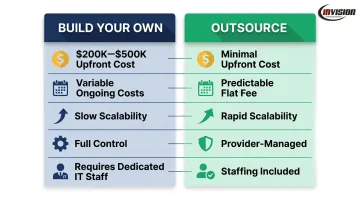
| Dimension | Building Your Own | Outsourcing |
|---|---|---|
| Upfront Cost | $200K–$500K+ (construction, hardware, electrical) | Minimal to none |
| Ongoing Monthly Cost | Variable — energy, staffing, maintenance | Predictable flat or per-user fee |
| Scalability | Slow and expensive — requires hardware procurement | Rapid — scale up or down on demand |
| Control & Customization | Full control over hardware and configuration | Provider manages environment; limited customization |
| IT Staffing Required | Yes — 24/7 monitoring requires dedicated staff | Included in service agreement |
| Compliance/Security | Your responsibility to build and maintain | Typically bundled or available as add-on tier |
The core asymmetry: building demands high capital expenditure upfront, with variable costs that can level off at scale. Outsourcing eliminates that initial spend but adds up in recurring fees — and those fees don't shrink the way you might expect for smaller organizations. What works for a 500-person enterprise rarely maps cleanly onto a 50-person SMB.
The Real Cost of Building Your Own Data Center
What "Building Your Own" Actually Means for SMBs
In the SMB context, "building your own data center" ranges from a server closet in a back office to a dedicated on-premise server room. The scale varies, but the cost categories don't — every configuration involves physical space, power infrastructure, cooling, hardware, and someone responsible for keeping it running.
Capital Costs
According to ENCOR Advisors, constructing a small business data center typically costs $200,000 to $500,000, with construction costs running $600 to $1,100 per square foot for standard facilities. That range has compressed upward recently — average cost per square foot has jumped nearly 50% year-over-year to approximately $1,000, driven by cooling upgrades and equipment inflation.
Where does that money go? A rough breakdown:
- Electrical systems: 40–45% of total build costs — the single largest category
- HVAC and cooling: 15–20% of total build costs
- Building shell: 15–20%
- Interior fit-out: 20–25%
Operational Costs That Never Stop
Construction is only the beginning. Once built, a small business server room carries:
- Annual maintenance and operations: $50,000–$100,000 for smaller facilities
- Energy costs: Electricity typically accounts for 20–40% of ongoing operating expenses — and cooling alone can consume 30–55% of total facility energy
- Hardware refresh cycles: Every 3–5 years, servers and storage need replacement
- Staffing: 24/7 monitoring requires dedicated personnel — not a part-time responsibility
- Software licensing: Separate from hardware, adding thousands annually
- Compliance audits: Ongoing cost in regulated industries
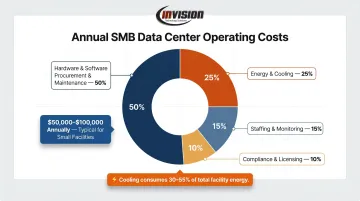
Hardware and software procurement and maintenance together account for nearly 50% of yearly operating budgets, per ENCOR Advisors.
Hidden Costs That Inflate Real-World Budgets
This is where initial estimates break down. Build costs can exceed projections by up to 80%, and 9 out of 10 large infrastructure projects experience schedule overruns.
The biggest culprits:
- Equipment lead times: Transformer procurement now averages 128 weeks — roughly 2.5 years. Switchgear can take nearly 3 years. Cooling systems run 40–50 weeks. The U.S. Department of Energy has flagged transformer shortages as a national security risk.
- Commissioning and testing: Required before systems go live, adding cost and time
- Permit and regulatory approvals: Often underestimated in initial budgets
- Downtime exposure: Without redundancy built in, a single failure becomes a crisis
When Building Makes Sense
Despite those risks, a few specific scenarios genuinely justify the capital outlay:
- Government contractors handling classified data or requiring air-gapped networks — cloud and colocation can't satisfy these requirements
- Latency-sensitive applications where network round-trip to a cloud provider introduces unacceptable delay
- Large enterprises with stable, high-volume compute workloads that run continuously — where amortized hardware costs eventually undercut cloud subscription fees
- Strict data sovereignty requirements in regions with unreliable connectivity
For most SMBs in healthcare, legal, manufacturing, or professional services, none of these conditions apply. HIPAA compliance is achievable through certified managed providers. PCI-DSS requirements are met through properly configured cloud platforms with a signed Business Associate Agreement.
Proprietary infrastructure is rarely a technical necessity. It's a default assumption — and an expensive one.
The Cost of Outsourcing: Managed IT, Cloud, and Colocation
Three Models, Three Cost Structures
Managed IT Services: A provider manages your entire IT environment for a flat monthly or per-user fee. Monitoring, support, security tools, and infrastructure management are bundled. This is the most hands-off option.
Cloud Services: Compute and storage hosted by providers like AWS or Azure, billed on consumption. Pay-as-you-go pricing offers flexibility but can spike unpredictably. Reserved capacity (1–3 year commitments) reduces costs by up to 72% versus on-demand pricing, but trades flexibility for savings.
Colocation: You own the hardware; you rent physical space, power, and cooling in a professional facility. A quarter rack runs approximately $399/month; a half rack around $699/month. Major providers like Equinix and Iron Mountain charge $500–$4,000 per cabinet depending on specifications. You still manage your own hardware — colocation just gives it a more reliable home.
What Managed IT Services Actually Cost
Published benchmarks from The Network Installers place managed IT services at $100–$300 per user per month, with most comprehensive agreements falling between $150–$250 per user monthly. Highly specialized or compliance-intensive engagements can reach higher, but that's the exception.
What's typically included in that fee:
- 24/7 network monitoring and alerting
- Help desk and technical support
- Patch management and OS updates
- Endpoint protection (antivirus, anti-malware)
- Basic backup management
- Strategic IT planning (vCIO)
What's often a separate add-on:
- Advanced disaster recovery and business continuity
- Microsoft 365 and line-of-business software licensing
- SOC/SIEM-level security monitoring
- Compliance-specific tooling
The inclusion of monitoring, endpoint security, and patch management in a flat fee matters significantly when comparing true costs. Those same services, procured independently for an in-house environment, are separate line items.
InVision Technology Solutions: A Phoenix Metro Example of Flexible Managed IT
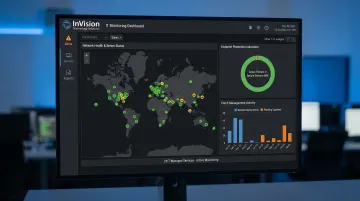
InVision Technology Solutions, a Scottsdale-based managed IT provider, illustrates what this cost structure looks like in practice. Their InWatch Monitoring program covers 24/7 server and network monitoring, endpoint protection, and patch management under a tiered plan structure — with no long-term contracts required.
For SMBs weighing in-house infrastructure costs against a flat managed services fee, that flexibility matters. Businesses can scale up or down as headcount and workload change, without committing to capacity they may not need.
InVision also supports hybrid environments, managing monitoring and backup for clients who retain some on-premise servers while offloading secondary workloads to managed or cloud platforms.
Where Outsourcing Delivers the Most Value
Outsourcing works best for:
- Businesses with 10–200 employees that need carrier-grade uptime and redundancy without the capital to build it
- Regulated industries (healthcare, legal, finance) that need certified, compliant infrastructure without building proprietary systems
- Growing companies where workload fluctuates — paying for elastic capacity beats buying hardware that sits idle
Where outsourcing can become expensive: large-scale, data-intensive workloads at hyper-scale volumes, or organizations with infrastructure needs so specific that no standard managed offering fits. At that point, the economics of dedicated infrastructure start to shift.
Building vs. Outsourcing: Which Makes More Sense?
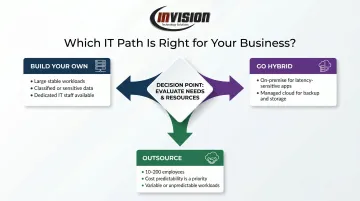
Four questions cut through most of the noise:
- Scale of compute needs — Does your data volume and processing load justify a dedicated facility? For most SMBs, the honest answer is no.
- Compliance requirements — Do you need proprietary infrastructure, or can a certified managed provider satisfy your regulatory obligations? Most regulated industries accept managed providers with proper certifications and SLAs.
- Internal IT capability — Do you have, or plan to hire, staff with the expertise to manage infrastructure 24/7? The cost of that staffing is rarely included in initial build estimates.
- Growth trajectory — Is your usage stable and predictable, or variable enough to make fixed infrastructure a financial risk?
Based on your answers, here's where most organizations land:
- Build your own if you have large, stable, specialized workloads — classified data, extreme latency sensitivity, or continuous high-volume compute — plus the capital and IT talent to manage it long-term.
- Outsource if your priority is cost predictability, scalability, and keeping IT from draining your team's time and focus. That describes the majority of SMBs.
- Go hybrid if you need on-premise servers for latency-sensitive applications but want to move backup, storage, and secondary workloads to managed or cloud environments. It's a practical middle path that many Phoenix-area businesses use successfully.
Still unsure which direction fits your business? Working through the numbers with a local IT partner often clarifies the decision faster than any framework. InVision Technology Solutions provides environment assessments for businesses across the Phoenix Metro area — call 480-699-8077 to start that conversation.
Real-World Scenarios: What SMBs Actually Experience
Scenario 1: The Hidden Costs of Building
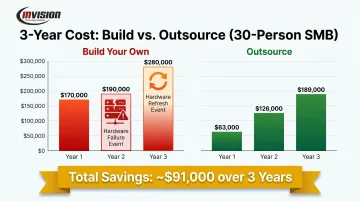
A 30-person professional services firm invests in an on-premise server room. Initial build cost: roughly $150,000, covering servers, networking equipment, UPS systems, and basic cooling. The IT contractor who set it up estimated annual maintenance at $20,000.
Year one looks manageable. Then reality sets in: energy costs run higher than projected, and a hardware failure in year two triggers emergency replacement — six weeks on backorder, an unplanned contractor bill, and a week of degraded performance.
By year three, the original servers are approaching end-of-life. A hardware refresh quote comes in at $60,000.
Total cost over three years: closer to $280,000. The original estimate was $210,000. Build costs exceeding projections by 80% isn't an outlier — it's a documented pattern.
Scenario 2: The Outsourcing Shift
A similar-sized firm transitions from on-premise infrastructure to a managed IT services agreement at $175 per user per month — approximately $5,250/month for 30 users, or $63,000/year.
The shift is immediate. Key differences from day one:
- No emergency hardware replacement bills
- No scrambling for a contractor when something breaks at 11pm
- No hardware refresh decisions looming in three years
- 24/7 monitoring catches issues before they become outages
- Enterprise-grade endpoint security included
Over three years, total spend: approximately $189,000 — predictable and without the variance spikes.
The Takeaway
Outsourcing typically delivers faster ROI for SMBs because it eliminates stranded costs, removes unpredictable capital events, and shifts IT from a management burden to a predictable operating expense. Research from Tomorrow's Office shows 55% of SMBs already outsource at least some IT infrastructure, and 33% of companies using managed service providers report cost reductions between 25% and 49%.
Frequently Asked Questions
How much do managed data center services cost?
Managed IT services typically run $150–$300 per user per month for comprehensive agreements, with most businesses landing between $150–$250. Monitoring-only arrangements cost less; fully managed infrastructure with security and compliance support sits at the higher end.
What are three costs associated with data center management?
Power consumption, staffing and labor, and hardware maintenance are the three primary ongoing costs. Together, they can drive annual operational expenses into the tens of thousands for small server rooms — and into the millions for larger facilities.
Is it cheaper to build your own server room or outsource IT infrastructure?
For most SMBs, outsourcing is more cost-effective when total cost of ownership is factored in — including staffing, hardware refresh cycles, energy, and downtime risk. Building only outperforms outsourcing at significant scale with stable, high-volume, continuous workloads.
What is the difference between colocation and managed IT services?
Colocation means you own your hardware but rent physical space, power, and cooling in a shared facility — you're still responsible for managing the equipment. Managed IT services means the provider handles the infrastructure entirely, leaving you with no operational responsibility.
How do I know if my business needs a dedicated data center?
Most businesses under 200 employees don't need one. Two signals suggest otherwise: compliance requirements so specialized no managed provider can meet them, or compute volumes so high that consumption-based pricing becomes prohibitively expensive at your scale.
What should small businesses look for in an outsourced IT provider?
Prioritize transparent flat-fee pricing, compliance certifications relevant to your industry, and 24/7 monitoring with defined response times. The ability to scale without long-term contracts is a strong sign the provider is confident in their service quality.