The problem isn't just inconvenience. According to ITIC's 2024 research, small and midsize businesses with up to 200 users can incur $10,000–$25,000 per hour of downtime. For a business running on tight margins, even a two-hour outage can erase a week of profit.
Hiring a full-time IT person isn't always a realistic fix. The median salary for a computer support specialist is $60,340 per year according to the U.S. Bureau of Labor Statistics — before benefits, taxes, and turnover costs. Most small businesses can't absorb that.
The smarter path: outsource the right IT functions to a managed service provider (MSP) that handles everything proactively. This article breaks down the six IT services that deliver the most value when outsourced — and what to look for in a provider.
Key Takeaways
- Network downtime costs SMBs up to $25,000/hour — proactive managed IT prevents most of it
- The 6 highest-ROI IT services to outsource: cybersecurity, network monitoring, help desk support, data backup/recovery, Microsoft 365 management, and VoIP
- Outsourcing replaces reactive firefighting with consistent, prevention-focused IT management
- Certifications, guaranteed response times, and flat-rate pricing mean fewer surprises and faster fixes
- For Phoenix Metro businesses, local support means faster on-site response when remote isn't enough
Why Small Businesses Outsource IT
Small businesses face a real bind: their technology needs — secure networks, cloud platforms, remote access, compliance — are nearly as complex as larger organizations, but their budgets aren't.
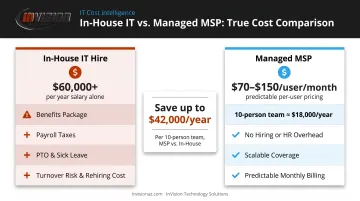
Hiring even one dedicated IT support specialist runs $60,000+ per year. Compare that to MSP pricing, which typically ranges from $70–$150 per user per month for small businesses according to the MSP Association of America. For a 10-person team, that's potentially $18,000/year versus $60,000+ — and the MSP comes with an entire team, not one person.
The Three Pain Points That Push Businesses to Outsource
1. Unpredictable costs: The break-fix model (pay per incident) sounds simple until a server fails on a Friday afternoon. Emergency labor, hardware replacement, and lost productivity add up fast with zero warning.
2. No proactive monitoring: Most small businesses don't know something is wrong until it's already broken. By then, damage is done.
3. Cybersecurity gaps: Small businesses rarely have dedicated security coverage, making them attractive targets.
Reactive vs. Proactive IT
Each of those pain points traces back to the same root cause: reactive IT. The break-fix model is simple — something breaks, you call someone, you pay. The managed model flips that: a monthly fee covers continuous monitoring, maintenance, and support before problems escalate.
InVision Technology Solutions describes this as escaping the "break/fix cycle" — where fixing one problem exposes another. Their InWatch monitoring system runs 24/7 across all servers, desktops, laptops, and network devices. Average response time is 5 minutes; average resolution time is 11.9 minutes — fast enough that most issues are closed before users even notice them.
6 IT Services Small Businesses Should Outsource
Not all IT functions carry equal weight. These six cover both day-to-day operations and long-term security — and all deliver measurable ROI when handled by a qualified MSP.
1. Cybersecurity
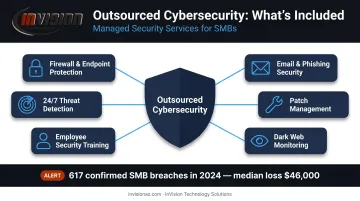
Outsourced cybersecurity isn't a product you install once. It's an ongoing service that includes:
- Firewall management and endpoint protection
- Email and phishing security
- Patch management and software updates
- Dark web monitoring
- Security awareness training for employees
- 24/7 threat detection and incident response
Small businesses are attractive targets precisely because they tend to have weaker defenses. CISA explicitly notes that small businesses are particularly vulnerable to ransomware because they often lack the resources to defend against it. The 2024 Verizon Data Breach Investigations Report recorded 617 confirmed data breaches involving small organizations, with a median ransomware/extortion loss of $46,000.
When evaluating a cybersecurity provider, look for:
- Relevant certifications (Cisco Security Specialized, for example)
- 24/7 threat monitoring — not just business-hours coverage
- Documented incident response procedures
- Employee training programs
InVision holds Cisco Security Specialized certification and provides 24/7 network monitoring through InWatch, making it a credentialed local option for Phoenix Metro businesses that need verified security expertise rather than a checkbox.
2. Network Monitoring & Management
Network monitoring means continuous surveillance of every connected device — servers, workstations, routers, switches — to catch issues before they cause downtime. Without it, you find out about problems from employees who can't work rather than from a proactive alert.
At $10,000–$25,000 per hour of downtime, even one prevented outage per year can cover months of managed service fees.
A capable MSP handles most issues remotely, long before users notice a problem. InVision's InWatch system provides:
- Continuous anomaly detection across your entire network
- Automated alerts and remote remediation
- On-site dispatch when remote resolution isn't enough
- After-hours and weekend availability for emergencies
3. Help Desk & Technical Support
Outsourced help desk covers remote and on-site troubleshooting for hardware, software, connectivity, and user issues. The difference between a good help desk and a bad one often comes down to response time.
Waiting hours for a callback when your office manager can't access accounting software isn't acceptable. InVision guarantees a 1-hour response time for managed service clients, with an average actual response time of 5 minutes — and every call is answered by a staff member, not an automated system.
The numbers make the case:
- One in-house IT support specialist = $60,000+/year salary, plus benefits, PTO, and turnover risk
- Outsourced help desk = a full team of specialists at a fraction of that cost, with broader expertise across hardware, software, cloud, and security
- Each InVision client also gets two dedicated engineers (primary and secondary) who know their environment — no explaining your setup from scratch every time you call
4. Data Backup & Disaster Recovery
Having a backup drive is not a disaster recovery plan. A proper solution includes:
- On-site and cloud-based backups (redundant storage)
- Regular testing of backup integrity
- Documented recovery procedures
- Defined recovery time objectives (RTO) — how fast you're back online
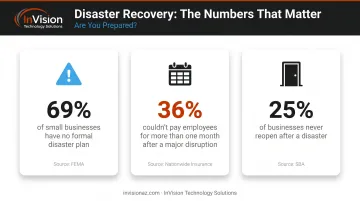
The consequences of skipping this are severe. A U.S. Chamber Foundation and Verizon report found that 69% of small businesses have no formal disaster plan, and 36% couldn't pay employees for more than one month after a major disruption. The SBA states 25% of businesses never reopen after a disaster.
For Phoenix Metro businesses, this isn't abstract. Ransomware, hardware failure, accidental deletion, and even monsoon-season power surges are real risks. InVision uses Veeam and Barracuda Networks for backup and recovery, with solutions designed to restore operations in minutes, not hours or days.
5. Cloud Services & Microsoft 365 Management
Microsoft 365 is not plug-and-play. An improperly configured tenant creates:
- Security gaps in SharePoint, Teams, and Exchange
- Wasted licenses for unused or duplicate accounts
- Compliance violations in regulated industries
- Exposure to identity-based attacks (Microsoft reports over 600 million daily attacks on identity systems)
A certified Microsoft Partner handles tenant setup, license management, security baselines, and ongoing optimization. Forrester research commissioned by Microsoft found that SMBs using Microsoft 365 for Business achieved a 223% ROI with payback in under six months — a gap that comes directly from proper configuration, not just access to the tools.
InVision is a Certified Microsoft Partner and certified Office 365 provider, with experience across numerous M365 migrations. Tools like Teams, SharePoint, Exchange, and OneDrive require configuration beyond default settings to be both secure and cost-effective.
6. VoIP & Business Communications
VoIP replaces traditional phone lines with cloud-based communication — handling call routing, voicemail, conferencing, and CRM integration at lower cost and with more flexibility. It's especially valuable for businesses with remote or hybrid staff.
For a five-person team, annual phone costs run roughly $900–$2,400 for VoIP versus $4,200–$6,600 for traditional landlines. That said, VoIP isn't maintenance-free. It requires proper security configuration, network quality tuning, and ongoing management to stay reliable.
InVision offers both hosted and on-premise VoIP solutions, supporting Cisco and Switchvox (Sangoma) systems. Bundling VoIP with managed IT means one provider handles everything — including voice quality issues that would otherwise generate a blame loop between your telecom vendor and your IT team.
How to Choose the Right IT Outsourcing Partner
The cheapest MSP is rarely the right one. Here's what actually matters when evaluating a provider:
Certifications and Credentials
- Microsoft Partner status (for M365 support and cloud management)
- Cisco Specialized or Select Certified (for network and security work)
- Industry-specific compliance experience (HIPAA, PCI DSS, SOX)
Defined Service Levels
- Guaranteed response times in writing — not just a verbal promise
- Clear escalation procedures for after-hours emergencies
- On-site dispatch capability when remote support isn't enough
Transparent Pricing
- No hidden fees for after-hours calls or urgent tickets
- Predictable monthly billing, not surprise invoices
Compliance Capability
- If you're in healthcare, legal, finance, or dental, ask specifically how they handle HIPAA, PCI DSS, or Gramm-Leach-Bliley compliance
- This shouldn't be an afterthought — it should be part of the onboarding conversation
What to Avoid
- Signing a long-term contract before completing a trial period
- Choosing based on price alone without evaluating service depth
- Working with a provider that has no local presence when you need on-site help
These criteria aren't abstract — they reflect common friction points businesses run into after signing with the wrong provider. InVision Technology Solutions operates with no service commitment period and a local team based in Scottsdale, providing on-site support across the Phoenix Metro area, including after-hours and weekend emergency dispatch.
Conclusion
Businesses that hand off cybersecurity, monitoring, help desk, backup, cloud management, and communications to a qualified MSP spend less time firefighting and more time on what actually grows the business. The operational difference is measurable — fewer disruptions, faster response, and IT that works proactively rather than reactively.
The right partner isn't the biggest or the cheapest. It's the one with the right certifications, the right response standards, and the accountability that comes from treating clients as long-term partners, not monthly tickets.
InVision Technology Solutions has been serving small businesses across the Phoenix Metro area since 2006 — nearly two decades, with certified expertise in cybersecurity, network management, Microsoft 365, VoIP, and backup/recovery — backed by a 5-minute average response time and 99.9% uptime commitment. No long-term contracts required.
Ready to stop managing IT problems and start preventing them? Contact InVision at (480) 699-8077 or info@invisionaz.com to schedule a consultation.
Frequently Asked Questions
How much do IT services cost for a small business?
Most MSPs charge $70–$150 per user per month for small businesses with under 50 employees, though comprehensive packages with cybersecurity and compliance support can run $150–$400 per user per month. Final pricing depends on service scope, user count, and any add-ons like backup or compliance monitoring.
What is the best IT solution for a small business?
There's no universal answer — the right fit depends on your industry, headcount, compliance requirements, and budget. For most small businesses, a bundled managed IT plan covering cybersecurity, monitoring, and help desk provides the most comprehensive protection under a single, predictable contract.
What IT services should a small business outsource first?
Start with cybersecurity and help desk support. Cybersecurity addresses your biggest risk exposure, while help desk delivers immediate, visible value by reducing daily disruptions. Both have fast ROI and lay the foundation for everything else.
What is the difference between managed IT services and break-fix IT support?
Break-fix is reactive — you pay per incident when something fails. Managed IT takes the opposite approach: a flat monthly fee covers monitoring, maintenance, and support before problems escalate. Over time, managed IT is more predictable and cost-effective.
How do I know if my small business is ready to outsource IT?
Common signs: IT issues are regularly disrupting operations, no one is responsible for cybersecurity, backups are inconsistent or untested, or your business is growing faster than your current tech setup can support. Any one of these is enough reason to have the conversation.
Can a very small business (under 10 employees) benefit from managed IT services?
Yes — often more than larger organizations. With no internal IT resources, small teams face the same cyber threats and compliance requirements as larger companies but without the staff to address them. An MSP fills that gap at a fraction of the cost of a single in-house hire.