This article is written for IT managers, business owners, and operations leads at small-to-large businesses, particularly those in regulated industries like healthcare, legal, and financial services. In those environments, downtime isn't just an inconvenience. It translates directly to lost revenue, compliance exposure, and damaged client relationships. According to ITIC's 2024 research, 57% of companies with 20 to 100 employees report that a single hour of downtime costs up to $100,000.
Many organizations know the term DRaaS but misunderstand how it actually works, what separates it from a backup solution, and when it is or isn't the right fit. This article covers all three.
Key Takeaways
- DRaaS replicates your entire IT environment to the cloud so operations resume within minutes of a disaster
- Unlike data backup, DRaaS restores full infrastructure: servers, applications, and user settings
- Two metrics define DRaaS performance: RTO (how fast systems come back online) and RPO (how much data can be lost)
- DRaaS is especially valuable for healthcare, legal, and financial services businesses facing strict recovery and compliance mandates
- DRaaS isn't right for every organization; size, budget, IT maturity, and workload criticality all affect its value
What Is Disaster Recovery as a Service (DRaaS)?
DRaaS is a subscription-based service in which a third-party provider continuously replicates a business's IT workloads—servers, applications, and data—to cloud infrastructure, enabling rapid failover and failback when a disruptive event occurs. Whether the cause is ransomware, a hardware failure, a fire, or a regional power outage, your operations shift to a mirrored environment so employees, customers, and processes keep functioning with minimal interruption.
DRaaS is often confused with similar-sounding services. Here's how it differs:
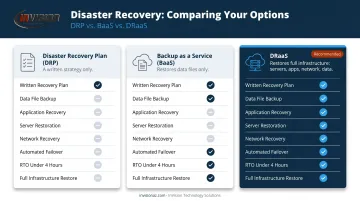
- DRaaS vs. a Disaster Recovery Plan (DRP): A DRP is a document. DRaaS is the live technical infrastructure and managed service that actually executes that plan.
- DRaaS vs. Backup as a Service (BaaS): BaaS protects data files and enables data restoration. DRaaS restores full operational recovery—servers, applications, network configurations, and data—not just files.
Why Businesses in Regulated Industries Rely on DRaaS
The Financial Case
Downtime compounds fast. Beyond the immediate revenue loss from halted transactions, there's idle staff, potential contract penalties, and the reputational cost of telling clients your systems are down. The $100,000-per-hour figure cited above isn't a worst-case outlier—it reflects reality for businesses that depend on continuous system availability.
The harder problem is that most organizations overestimate their readiness. An Arcserve study of companies with 100 to 2,500 employees found that while 95% reported having a DR plan, only 24% had one that was well documented, tested, and current.
A secondary data center requires significant upfront investment and ongoing maintenance. DRaaS eliminates both. Organizations pay for what they use on a subscription basis, which puts enterprise-grade resilience within reach for Phoenix Metro businesses that couldn't justify the capital cost of a dedicated recovery site.
Compliance Requirements in Healthcare, Legal, and Finance
Regulated industries must go further than protecting data: they're required to demonstrate documented, tested recovery processes.
- Healthcare (HIPAA): 45 CFR 164.308(a)(7) requires covered entities to maintain a data backup plan, a disaster recovery plan, and an emergency mode operation plan as part of the Security Rule's administrative safeguards
- Financial services (SOX, PCI DSS): Recovery controls that affect financial reporting integrity and cardholder data availability fall within scope for auditors and examiners
- Legal practices: Client confidentiality obligations and bar ethics rules create de facto data protection and availability requirements
DRaaS supports these obligations through:
- Automated audit trails and compliance reporting
- Verifiable recovery testing documentation
- Consistent, repeatable failover processes auditors can review
The Ransomware Factor
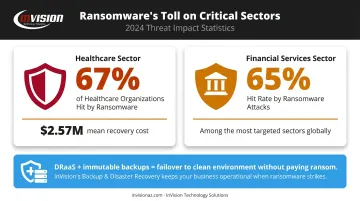
Sophos reported that 67% of healthcare organizations were hit by ransomware in 2024, with mean recovery costs reaching $2.57 million. Financial services weren't far behind at 65% hit rate. When ransomware encrypts production systems, DRaaS combined with immutable backups allows failover to a clean, uncompromised environment, bypassing any need to pay a ransom.
How DRaaS Works: Replication, Failover, and Failback
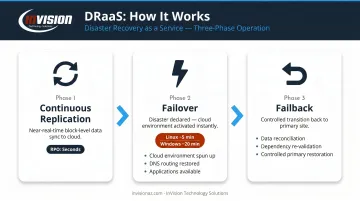
DRaaS operates through a continuous three-phase cycle: replication, failover, and failback. Each phase has distinct technical requirements — and weak execution in any one of them can undermine the entire recovery plan.
Phase 1: Continuous Replication
The DRaaS solution takes regular snapshots—or uses near-real-time block-level replication—to maintain a synchronized copy of critical workloads in the provider's cloud infrastructure. Replication frequency directly determines your RPO: the shorter the interval between snapshots, the less data you can lose in a disaster.
Platforms like AWS Elastic Disaster Recovery use continuous block-level replication, achieving RPOs typically measured in seconds. Microsoft Azure Site Recovery supports replication frequencies as low as 30 seconds for Hyper-V environments.
Phase 2: Disaster Declaration and Failover
When a disaster is declared—either automatically via monitoring alerts or manually by IT staff—the DRaaS platform orchestrates the failover:
- Spins up the mirrored environment in the cloud
- Restores network configurations and DNS routing
- Makes applications available to end users
Well-configured DRaaS reduces RTO from days to minutes. AWS documentation puts average recovered Linux server boot time at approximately 5 minutes, Windows at 20 minutes. The exact RTO depends on workload complexity and how thoroughly the configuration has been tested.
Phase 3: Failback
Once the primary environment is repaired and validated, the provider manages the failback process: syncing all data changes that accumulated during failover back to the primary site, then transitioning operations in a controlled sequence.
Failback is the most overlooked phase of DR planning — and the one most likely to introduce data consistency problems if configurations haven't been tested end-to-end. Before any failback, verify:
- Data delta between cloud and primary site is fully reconciled
- Application dependencies are mapped and re-validated
- A rollback path exists if the primary site fails again during transition
The Three DRaaS Delivery Models
Choosing the right model depends on your internal IT capability, budget, and how much hands-on involvement you want in DR operations.
| Model | Who Manages DR | Best Fit |
|---|---|---|
| Self-Service | Client manages DR using provider tools | Technically sophisticated internal IT teams |
| Assisted | Provider supports planning and incidents; client retains operational involvement | Mid-sized businesses with partial IT staff |
| Managed | Provider owns DR environment, planning, testing, and execution | Businesses without dedicated IT departments |
For most small-to-mid-sized businesses, managed DRaaS is the practical choice. InVision Technology Solutions works with Phoenix Metro businesses to identify the right fit and handles the full DRaaS lifecycle — configuration, testing, and ongoing management — on platforms like Veeam and Barracuda Networks.
Key Factors That Determine DRaaS Effectiveness
Not all DRaaS deployments deliver when it counts. These are the factors that separate a functional recovery strategy from one that fails under pressure:
RTO and RPO targets: Applying near-zero RPO across every workload inflates cost fast. Tier workloads by criticality and assign objectives accordingly—most systems don't need mission-critical treatment.
Replication frequency tightens RPO but demands adequate bandwidth. Constrained connectivity between your primary site and the cloud environment introduces lag that quietly erodes your recovery window.
Geographic redundancy: A provider whose recovery infrastructure shares your region offers limited protection. Extended grid failures and severe weather can take down both sites simultaneously—confirm recovery infrastructure is geographically separated.
Testing frequency: A 2023 DRJ/Forrester study found 56% of organizations never run a full simulation. An untested plan degrades as your environment changes—quarterly tabletop exercises, partial failover drills, and periodic full simulations are all necessary.
Compliance certifications and data residency: Regulated industries require providers with SOC 2 Type II, ISO 27001, or HIPAA BAA certifications, plus confirmation that replicated data stays within the required jurisdictional boundaries.
Common Misconceptions About DRaaS—and When It May Not Be the Right Choice
Misconception 1: Cloud Backups Equal DRaaS
Many organizations assume that because their data is in the cloud, they have disaster recovery. They don't. Standard cloud storage and BaaS protect data files and enable data restoration. They do not replicate full infrastructure, they do not provide orchestrated failover, and recovering from them requires a manual rebuild that can take days. DRaaS is the operational layer that executes recovery automatically.
Misconception 2: DRaaS Works Without Ongoing Governance
DRaaS isn't a switch you flip and forget. Effectiveness depends on accurately maintained workload inventories, correctly configured runbooks, and tested recovery procedures.
IT environments change constantly—new applications get added, servers migrate, personnel turns over. Without an active process for keeping the configuration current, DRaaS will be out of sync with the environment it's supposed to protect.
When DRaaS May Not Be the Right Fit
DRaaS isn't always the answer. Consider a simpler backup strategy or hybrid approach when:
- The organization has very few critical workloads
- Budget constraints are severe and downtime risk is genuinely low
- Legacy environments with highly customized configurations don't replicate cleanly to cloud infrastructure
The right decision should come from a Business Impact Analysis (BIA). NIST SP 800-34 identifies BIA as the foundation of contingency planning, and it covers the three questions that matter most:
- Which workloads are truly business-critical?
- What does an hour (or a day) of downtime actually cost?
- How quickly does each system need to be back online?
There's one more failure pattern worth naming: purchasing DRaaS primarily to satisfy an audit requirement. When compliance is the only driver, the solution gets under-configured and under-tested. A passing audit and an operational recovery plan are not the same thing.
Frequently Asked Questions
What is disaster recovery as a service?
DRaaS is a cloud-based, third-party managed service that replicates an organization's IT workloads—servers, applications, and data—to a remote environment and provides orchestrated failover and failback capabilities. When a disaster occurs, operations shift to the mirrored environment within minutes, minimizing both downtime and data loss.
What is the difference between BaaS and DRaaS?
BaaS protects data files and allows you to restore them. DRaaS replicates the full IT stack—servers, applications, infrastructure, and data—and automates failover so operations continue within minutes. Recovering from BaaS alone typically requires rebuilding infrastructure manually, which can take days.
What are the 4 C's of disaster recovery?
The 4 C's commonly referenced in disaster recovery are Communication, Coordination, Cooperation, and Collaboration. Together, they describe how organizations and their partners must align during a disaster—across teams, tools, and response actions—to execute recovery effectively.
What is the difference between RTO and RPO in DRaaS?
RTO (Recovery Time Objective) is the maximum acceptable time for systems to be restored after a disaster. RPO (Recovery Point Objective) is the maximum acceptable data loss, measured in time. Both must be defined upfront—they directly shape replication frequency, infrastructure design, and cost.
Is DRaaS a good fit for small and mid-sized businesses?
Often, yes. DRaaS eliminates the need for a costly secondary data center, and managed DRaaS models allow businesses without large IT departments to access enterprise-grade recovery capabilities on a subscription basis. The key is matching the service tier and cost to actual workload criticality rather than over-engineering the solution.
How often should a DRaaS plan be tested?
Best practice calls for at least quarterly testing using a combination of tabletop exercises, partial failover drills, and periodic full failover simulations. Testing frequency should increase whenever significant changes are made to the IT environment—new applications, infrastructure migrations, or staffing changes all affect recovery readiness.