Introduction
It's 9:30 AM on a Tuesday. A server goes down, employees can't access files, and three client deadlines are sitting in a queue that nobody can touch. Your remote IT vendor logs in, pokes around for 45 minutes, and tells you the problem requires a hands-on fix. Someone will be there by end of day.
By then, you've lost half a workday.
The difference between a 45-minute outage and a four-hour one often comes down to one factor: whether a qualified technician can be physically present to resolve the issue. Remote support has a ceiling — and when you hit it, the clock keeps running.
This article covers what onsite IT support actually is, why downtime costs Phoenix Metro businesses more than most owners realize, which problems genuinely require someone in the room, and how to evaluate a provider worth trusting.
Key Takeaways
- Onsite IT support means dispatching a qualified technician to your location for hardware, network, and infrastructure issues that can't be fixed remotely
- ITIC research shows that 57% of small businesses say a single hour of downtime can cost up to $100,000
- Hardware failures, network infrastructure, server environments, and emergency response all require hands-on presence — remote tools simply can't reach them
- A hybrid model — 24/7 remote monitoring paired with responsive onsite dispatch — delivers the most reliable coverage for SMBs
- When choosing a provider, local presence, response time guarantees, certified technicians, and contract flexibility matter most
What Is Onsite IT Support?
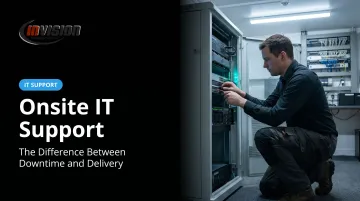
Onsite IT support is a service model where a qualified technician is physically dispatched to your business location to handle problems that require hands-on attention — servers, workstations, network cabling, peripheral devices, and infrastructure that no remote tool can touch.
How It Differs from Remote Support
Remote support uses secure virtual access to resolve software issues quickly and cost-effectively. It's excellent for password resets, cloud configuration, application errors, and most tier-1 help desk requests. But it hits a hard wall the moment the problem becomes physical.
Some problems simply require a person in the room:
- A crashed hard drive can't be diagnosed through a screen
- A misconfigured network switch requires someone to trace cables
- A workstation that won't power on needs hands on it
Most well-run businesses today use both. Remote support handles the high volume of daily software requests efficiently, while onsite support covers the physical interventions that keep infrastructure intact. What matters is whether your provider can deliver both without gaps.
The Real Cost of IT Downtime for Phoenix Metro Businesses
Most business owners think of IT downtime as an inconvenience. The numbers tell a different story.
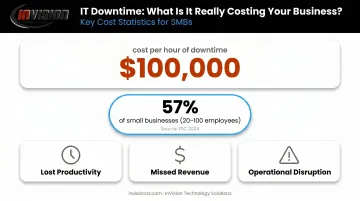
According to ITIC's 2024 downtime research, 57% of small businesses with 20–100 employees report that a single hour of downtime can cost up to $100,000 — accounting for lost productivity, missed revenue, and operational disruption. For context, that's not a catastrophic enterprise failure. That's a Tuesday morning server outage.
Downtime Is a Business Problem, Not Just a Tech Problem
Every hour a system is down:
- Employees sit idle or scramble through workarounds
- Client deliverables fall behind schedule
- Revenue-generating activities stall
- Leadership confidence in IT infrastructure erodes
The industries InVision Technology Solutions serves across Phoenix Metro feel this acutely. A healthcare clinic locked out of patient records must delay appointments and revert to paper, creating real compliance exposure. A law firm that can't access case files the morning of a hearing faces consequences no amount of IT recovery can undo.
The Compounding Effect
The longer resolution takes, the wider the damage spreads. An issue that could be resolved in 30 minutes by an onsite technician may stretch to four hours through remote-only troubleshooting, pulling in entire departments and derailing client commitments that depend on those connected systems.
Businesses that invest in regular onsite maintenance and monitoring catch deteriorating hardware, outdated configurations, and emerging vulnerabilities before they become outages. Proactive support doesn't just reduce downtime — it keeps revenue-generating operations running on schedule, which is where the real financial impact lives.
What Onsite IT Support Actually Covers
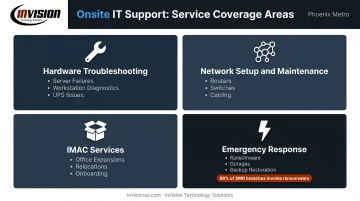
Hardware Troubleshooting and Repair
When a server fails, a workstation won't boot, or a critical peripheral breaks down, there's no remote substitute for a technician physically inspecting and testing components. Common hardware scenarios requiring onsite presence include:
- Server failures and drive replacements
- Workstation and laptop hardware diagnostics
- Router, switch, and firewall hardware issues
- Printer and peripheral device failures
- UPS and power infrastructure problems
Network Setup and Maintenance
Physical network infrastructure can't be configured from across town. Onsite technicians install and configure the full network stack (routers, switches, firewalls, cabling) and perform hands-on diagnostics for connectivity issues that remote tools can only partially assess.
Intermittent drops, performance degradation, and VLAN configuration problems all benefit from someone who can physically trace and test.
Installation, Move, Add, Change (IMAC) Services
Office expansions, equipment relocations, new employee onboarding, and post-reorganization reconfigurations all require physical presence. These projects (setting up new workstations, migrating servers, recabling after a move) can't be handed off to a remote team. InVision handles this as part of broader IT support, with after-hours and weekend availability specifically designed to minimize disruption during these transitions.
Emergency Response
Not all IT work is scheduled. When a ransomware attack hits, a server crashes, or a network goes completely down, having an onsite technician available cuts recovery time. Verizon's 2025 DBIR SMB Snapshot reports that ransomware appears in 88% of SMB breaches — a stark reminder that emergency response isn't a theoretical scenario for most businesses. Physical backup restoration, hardware replacement, and coordination with remote monitoring teams all happen faster with someone on-site.
Onsite vs. Remote IT Support: Knowing When You Need Both
| Issue Type | Remote Support | Onsite Support |
|---|---|---|
| Password resets | ✓ | — |
| Software errors and app crashes | ✓ | — |
| Cloud configuration | ✓ | — |
| Hardware failure | — | ✓ |
| Network infrastructure setup | — | ✓ |
| Cabling and physical connectivity | — | ✓ |
| Emergency response (ransomware, outage) | Partial | ✓ |
| New employee workstation setup | — | ✓ |
| Compliance infrastructure audits | — | ✓ |
Why the Hybrid Model Works
Remote support handles the volume. Most day-to-day IT issues — software glitches, access problems, cloud misconfigurations — can be resolved faster and cheaper through a secure remote session than through an onsite visit. A good remote monitoring platform catches issues before users even notice them.
But remote support has a physical ceiling. The moment the problem involves hardware, cabling, or anything that requires someone to touch a device, remote-only providers are stuck. The hybrid model solves this by pairing 24/7 remote monitoring with on-demand onsite dispatch, ensuring no issue falls through the gap between those two capabilities.
Small Businesses Need Onsite Support Too
Onsite support isn't just for large enterprises with complex setups. Small and mid-sized businesses — particularly those in regulated industries or running on physical hardware without in-house IT staff — often need it more. When a 20-person law firm's server goes down and nobody in the office can fix it, waiting for a remote vendor to escalate to dispatch turns a one-hour problem into a half-day crisis. That's not a large-enterprise problem — it's a small-business reality.
Key Benefits of Onsite IT Support
Faster Resolution When It Counts
A technician physically present can diagnose and fix hardware or network problems in real time, without the back-and-forth of remote troubleshooting. InVision Technology Solutions maintains an average response time of 5 minutes and a written 1-hour response guarantee for managed service clients — a meaningful operational advantage for Phoenix-area businesses where every hour of downtime carries real financial weight.
Proactive Maintenance Prevents Unplanned Outages
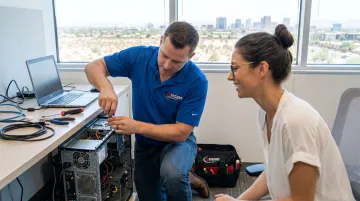
Regular onsite visits let technicians identify deteriorating hardware, aging configurations, and vulnerabilities before they trigger failures. InVision's InWatch 24/7 monitoring system flags potential issues around the clock, and when something warrants physical attention, the escalation to onsite dispatch is built into the same workflow — not handed off to a different team.
Compliance Support for Regulated Industries
For healthcare, legal, and financial services clients, compliance isn't just good practice — it's a legal obligation. Onsite technicians can conduct hands-on compliance checks that no remote dashboard can replicate:
- Physically audit infrastructure against current regulatory requirements
- Verify endpoint security configurations are correctly enforced
- Confirm regulated data handling meets HIPAA, FINRA, or applicable industry standards
Technicians Who Know Your Environment
Remote technicians work from tickets and screenshots. Onsite professionals develop firsthand familiarity with a business's specific systems, layout, and workflows — the kind of context that speeds up every future call.
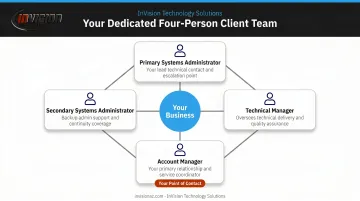
InVision assigns every client a dedicated four-person team: a primary and secondary systems administrator, a technical manager, and an account manager. That team knows your environment before a problem ever surfaces.
How to Choose the Right Onsite IT Support Partner
Local Presence and Response Time
Geography matters more than most buyers realize. A provider headquartered in another state — or even the other side of a large metro area — faces real logistical delays when onsite dispatch is needed. For businesses across Scottsdale, Phoenix, Chandler, Tempe, Mesa, Gilbert, and Glendale, working with a locally rooted provider means no travel delays and no outsourced dispatch chains.
InVision has been serving Phoenix Metro businesses since 2006 — nearly 20 years of building familiarity with the local business environment, client base, and regional infrastructure patterns. Their offices are in Scottsdale, not a national call center.
Certifications and Range of Services
When a hardware emergency happens, the last thing you want is to discover your IT provider can't handle the specific system that failed. Before signing anything, verify that technicians hold credentials relevant to your environment:
- CompTIA A+ or Network+ for general hardware and infrastructure
- Cisco CCNA for network configuration and troubleshooting
- Microsoft Certified Professional for server, cloud, and endpoint systems
Company-level partner status matters too. InVision holds Microsoft Silver Technology Partner and Select Certified Cisco Partner credentials — organizational commitments to technical standards, not just individual badges.
Transparent Agreements Without Lock-In
Service agreements should clearly define response time guarantees, escalation procedures, and scope of coverage. What they shouldn't do is trap you in multi-year contracts that benefit the provider more than the client.
InVision does not require service commitment periods. Clients can access onsite support — including after-hours and weekend emergency response — without long-term contracts. That approach reflects confidence in service quality, not a strategy for keeping clients locked in.
Frequently Asked Questions
What is onsite technical support?
Onsite technical support means a qualified IT technician physically comes to your business location to diagnose and resolve hardware, network, or infrastructure problems. This covers anything from a failed server to a network cabling issue that can't be addressed remotely.
What are examples of onsite support?
Common examples include replacing a failed server hard drive, setting up network switches and cabling in a new office, recovering data after a ransomware attack, configuring workstations for new employees, and performing physical infrastructure audits for compliance.
How much does IT support cost?
Costs vary based on scope, response time guarantees, and whether the arrangement is break-fix (pay-per-incident) or a managed services agreement. Kaseya's 2024 MSP Benchmark Survey reports that 63% of MSPs charge $101–$200 per hour for break-fix work, while managed plans vary by device count and service scope. When comparing options, weigh uptime guarantees and response time commitments alongside the monthly rate — not just the price.
When should a business use onsite instead of remote IT support?
Onsite support is necessary when the problem involves physical hardware, network infrastructure, or on-premises compliance checks. It's also the right call in emergencies where speed of resolution requires a technician on the ground.
Can onsite support be included in a managed services agreement?
Yes. InVision Technology Solutions includes onsite support as part of its managed services offering, combining 24/7 remote monitoring through InWatch with on-demand onsite dispatch — providing comprehensive coverage under a single, flexible arrangement.
What qualifications should an onsite IT technician have?
Look for technicians holding CompTIA A+, Network+, Microsoft Certified Professional, or Cisco CCNA credentials. Company-level partner status (such as Microsoft Silver Partner or Cisco Certified Partner) confirms the organization as a whole meets vendor technical standards, not just individual employees.